ipad六合一读卡器+AV线+HDMI
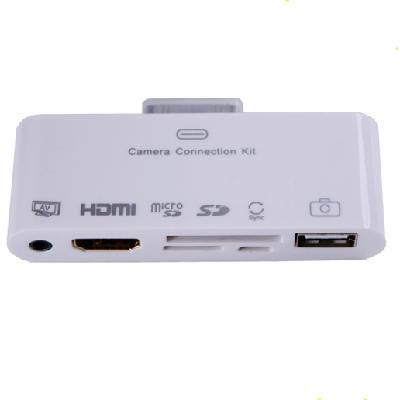
6合1 HDMI基座适配器AV USB连接线相机连接套件对于苹果iPad
使用HDMI相机连接套件适配器通过连接你的iPad令人难以置信的是观看大屏幕上的幻灯片和电影高达720p; iPhone 4; iPhone 4S的; iPod touch(第4代),HDTV或HDMI兼容的显示器。 可以支持高达1080p高清(在电影播放高达720p)。
通过HDMI连接套件,这是非常容易从数码相机下载照片到你的iPad了。 它给你导入照片和视频两种方式。 一种是使用USB连接线,另外一个是从SD / Micro SD卡读取。 该连接套件支持标准照片格式,如JPEG和RAW等。
版本:兼容IOS 5.0.1
优势:有AV端口和HDMI端口在一起,连接到iPad数据端口直接,无需安装软件。
缺点:由于不能保证所有功能正常工作时的IOS更新新版本
如何使用6种不同的端口:
1. HDMI端口:HDMI连接套件适配器连接到你的iPad; iPhone 4; iPhone 4S的; iPod touch(第4代)通过30针的基座接口和你的使用HDMI线HDMI兼容的显示器。 后,您可以享受高清晰度的电影,幻灯片。
2. SD卡端口:将连接到你的iPad上的底座连接器端口,然后插入你的SD卡。
3.微型SD卡端口:将连接到你的iPad上的底座连接器端口,然后将你的Micro SD卡
4.3.5毫米DC AV端口:输出视频到电视。 插头连接到您的iPad / iPhone / iTouch的/纳米/经典的底座连接器端口; 使用附带的电视电缆连接电视。
5.微型USB端口:充电和同步数据。 插头连接到您的iPad / iPhone / iTouch的/纳米/经典的底座连接器端口; 连接使用附带的迷你USB数据线电源适配器或电脑。
6. USB端口:将连接套件到你的iPad上的底座连接器端口,然后通过USB线连接数码相机或iPhone(iPhone3G的除外)。 通过USB闪存盘或导入照片到iPad。 此外,USB端口支持外部PC键盘输入。
插上连接后,你的iPad会自动打开照片应用程序,它可以让你选择要导入的照片,然后选定的照片整理成相册。 当同步iPad的到您的PC或Mac,这些照片在你的iPad将被添加到您的计算机的图像库。
6合1连接套件支持标准照片格式,如JPEG和RAW等图片文件需要保存命名的DCIM文件夹中。 数码相机可以自动创建DCIM文件夹,但如果USB闪存盘,你必须创建DCIM文件夹和手动复制。
注意:
该适配器仅支持4.3或以上,并达到完美的同步版本。 所以,请更新您的苹果设备为最新版本4.3! 敬请确保HDMI端口的电视机是1.3版或以上! 由于很高的要求,也请确保您的HDMI电缆是良好的品质和1.2版或以上!
使用HDMI相机连接套件适配器通过连接你的iPad令人难以置信的是观看大屏幕上的幻灯片和电影高达720p; iPhone 4; iPhone 4S的; iPod touch(第4代),HDTV或HDMI兼容的显示器。 可以支持高达1080p高清(在电影播放高达720p)。
通过HDMI连接套件,这是非常容易从数码相机下载照片到你的iPad了。 它给你导入照片和视频两种方式。 一种是使用USB连接线,另外一个是从SD / Micro SD卡读取。 该连接套件支持标准照片格式,如JPEG和RAW等。
版本:兼容IOS 5.0.1
优势:有AV端口和HDMI端口在一起,连接到iPad数据端口直接,无需安装软件。
缺点:由于不能保证所有功能正常工作时的IOS更新新版本
如何使用6种不同的端口:
1. HDMI端口:HDMI连接套件适配器连接到你的iPad; iPhone 4; iPhone 4S的; iPod touch(第4代)通过30针的基座接口和你的使用HDMI线HDMI兼容的显示器。 后,您可以享受高清晰度的电影,幻灯片。
2. SD卡端口:将连接到你的iPad上的底座连接器端口,然后插入你的SD卡。
3.微型SD卡端口:将连接到你的iPad上的底座连接器端口,然后将你的Micro SD卡
4.3.5毫米DC AV端口:输出视频到电视。 插头连接到您的iPad / iPhone / iTouch的/纳米/经典的底座连接器端口; 使用附带的电视电缆连接电视。
5.微型USB端口:充电和同步数据。 插头连接到您的iPad / iPhone / iTouch的/纳米/经典的底座连接器端口; 连接使用附带的迷你USB数据线电源适配器或电脑。
6. USB端口:将连接套件到你的iPad上的底座连接器端口,然后通过USB线连接数码相机或iPhone(iPhone3G的除外)。 通过USB闪存盘或导入照片到iPad。 此外,USB端口支持外部PC键盘输入。
插上连接后,你的iPad会自动打开照片应用程序,它可以让你选择要导入的照片,然后选定的照片整理成相册。 当同步iPad的到您的PC或Mac,这些照片在你的iPad将被添加到您的计算机的图像库。
6合1连接套件支持标准照片格式,如JPEG和RAW等图片文件需要保存命名的DCIM文件夹中。 数码相机可以自动创建DCIM文件夹,但如果USB闪存盘,你必须创建DCIM文件夹和手动复制。
注意:
该适配器仅支持4.3或以上,并达到完美的同步版本。 所以,请更新您的苹果设备为最新版本4.3! 敬请确保HDMI端口的电视机是1.3版或以上! 由于很高的要求,也请确保您的HDMI电缆是良好的品质和1.2版或以上!
6 in1 HDMI Dock Adapter AV USB Cable Camera Connection Kit For Apple iPad
Use the HDMI Camera Connection kit Adapter Incredibly Watch slideshows and movies on the big screen in up to 720p by connecting your iPad; iPhone 4; iPhone 4S ; iPod touch (4th generation) to an HDTV or HDMI-compatible display. Support can up to 1080p HD (movies play at up to 720p) .
Through the HDMI Connection Kit, it's incredibly easy to download photos from your digital camera to your iPad too. It gives you two ways to import photos and videos. One is using USB cable, another one is reading from SD/ Micro SD card. The Connection Kit supports standard photo formats, such as JPEG and RAW etc.
Version: Compatible with IOS 5.0.1
Advantage: Have AV port and HDMI port together , Connect to iPad data port directly, no software installation .
Disadvantage: With no guarantee that all functions normally work when IOS updates new version
How to use 6 different ports :
1. HDMI port: Connect the HDMI Connection kit Adapter to your iPad; iPhone 4; iPhone 4S; iPod touch (4th generation) via the 30-pin dock connector and to your HDMI-compatible display using an HDMI cable . After you can enjoy the High Definition movies, slideshows.
2. SD card port: Plug the connection into the dock connector port on your iPad, and then insert your SD card.
3. Micro SD card port: Plug the connection into the dock connector port on your iPad, and then insert your Micro SD card
4. 3.5mm DC AV port: Output video to TV. Plug the connection into the dock connector port on your iPad/ iPhone/ iTouch/ Nano/ Classic; attach TV using the accompanying TV cable.
5. Micro USB port: Charging & Sync data. Plug the connection into the dock connector port on your iPad/ iPhone/ iTouch/ Nano/ Classic; attach power adaptor or computer using the accompanying Mini USB cable.
6. USB port: Plug the connection kit into the dock connector port on your iPad, and then attach your digital camera or iPhone (excluded iPhone3G) via an USB cable. Or import photos to iPad through USB flash disk. Besides, the USB port supports external PC keyboard input.
After plug in the connection, your iPad automatically opens the Photos APP, which lets you choose photos to import, then organizes the selected photos into albums. When sync iPad to your PC or Mac, the photos in your iPad are added to your computer's image library.
The 6 in 1 Connection Kit supports standard photo formats, such as JPEG and RAW etc. The picture files need to be saved in named DCIM folder. The digital camera can create DCIM folder automatically, but if USB flash disk, you must create DCIM folder and copy manually.
Note:
This adapter support only version 4.3 or above and achieve perfect synchronization. So please update your Apple device to latest version 4.3! Please kindly make sure the HDMI Port of your TV is version 1.3 or above! Since the high requirement, please also be sure that your HDMI cable is of good quality and version 1.2 or above!
Use the HDMI Camera Connection kit Adapter Incredibly Watch slideshows and movies on the big screen in up to 720p by connecting your iPad; iPhone 4; iPhone 4S ; iPod touch (4th generation) to an HDTV or HDMI-compatible display. Support can up to 1080p HD (movies play at up to 720p) .
Through the HDMI Connection Kit, it's incredibly easy to download photos from your digital camera to your iPad too. It gives you two ways to import photos and videos. One is using USB cable, another one is reading from SD/ Micro SD card. The Connection Kit supports standard photo formats, such as JPEG and RAW etc.
Version: Compatible with IOS 5.0.1
Advantage: Have AV port and HDMI port together , Connect to iPad data port directly, no software installation .
Disadvantage: With no guarantee that all functions normally work when IOS updates new version
How to use 6 different ports :
1. HDMI port: Connect the HDMI Connection kit Adapter to your iPad; iPhone 4; iPhone 4S; iPod touch (4th generation) via the 30-pin dock connector and to your HDMI-compatible display using an HDMI cable . After you can enjoy the High Definition movies, slideshows.
2. SD card port: Plug the connection into the dock connector port on your iPad, and then insert your SD card.
3. Micro SD card port: Plug the connection into the dock connector port on your iPad, and then insert your Micro SD card
4. 3.5mm DC AV port: Output video to TV. Plug the connection into the dock connector port on your iPad/ iPhone/ iTouch/ Nano/ Classic; attach TV using the accompanying TV cable.
5. Micro USB port: Charging & Sync data. Plug the connection into the dock connector port on your iPad/ iPhone/ iTouch/ Nano/ Classic; attach power adaptor or computer using the accompanying Mini USB cable.
6. USB port: Plug the connection kit into the dock connector port on your iPad, and then attach your digital camera or iPhone (excluded iPhone3G) via an USB cable. Or import photos to iPad through USB flash disk. Besides, the USB port supports external PC keyboard input.
After plug in the connection, your iPad automatically opens the Photos APP, which lets you choose photos to import, then organizes the selected photos into albums. When sync iPad to your PC or Mac, the photos in your iPad are added to your computer's image library.
The 6 in 1 Connection Kit supports standard photo formats, such as JPEG and RAW etc. The picture files need to be saved in named DCIM folder. The digital camera can create DCIM folder automatically, but if USB flash disk, you must create DCIM folder and copy manually.
Note:
This adapter support only version 4.3 or above and achieve perfect synchronization. So please update your Apple device to latest version 4.3! Please kindly make sure the HDMI Port of your TV is version 1.3 or above! Since the high requirement, please also be sure that your HDMI cable is of good quality and version 1.2 or above!

&img=www.atupapa.com/show/wxbuyer/img/apk.png&url=//www.atupapa.com/show/wxbuyer/whatnear.apk)