ipad\iphone\ipod转VGA+音频输出线
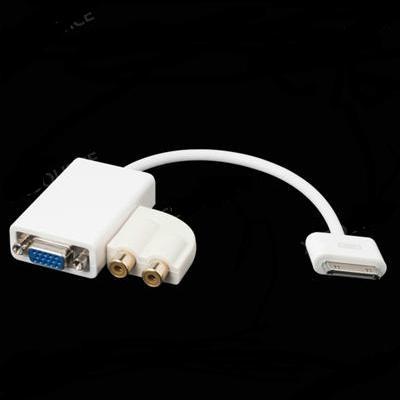
基座接口转VGA适配器音频输出为iPad 1 2 iPhone 3GS 4 4G 4S
描述:
iPad上VGA适配器能够与一个苹果的30pin输出接口连接任何VGA接口的嵌入式设备(显示器,电视机,投影机...)(新iPad / iPhone / iPod的)
使用iPad Dock连接到VGA适配器一个iPad连接到电视,投影仪或VGA显示器。 然后看到你的视频和幻灯片在大屏幕上
而iPad基座接口转VGA适配器通过底座连接器和投影机或显示器使用VGA适配器连接到你的iPad或iPad底座
音频输出可以连接扬声器的音频
您的设备必须更新到5.0或更高版本。
特别说明:
TV OUT将尽快适配器连接激活。 首先,你需要去设置页,选择常规设置,然后单击TV OUT选项。 然后,它会出现两个选项:NTSC(默认)和PAL电视信号选项。 你可以只享受视频和幻灯片在你的iPhone / iPad的/ iPod的,如果您的设备没有完成越狱。
如果您的设备做了越狱,你可以下载dispalyout(你需要为此付出代价的软件),这样你就可以得到更多的功能。
封装模块主要包括:
1个iPad的Dock连接到VGA +音频输出适配器
1 x用户卫队
描述:
iPad上VGA适配器能够与一个苹果的30pin输出接口连接任何VGA接口的嵌入式设备(显示器,电视机,投影机...)(新iPad / iPhone / iPod的)
使用iPad Dock连接到VGA适配器一个iPad连接到电视,投影仪或VGA显示器。 然后看到你的视频和幻灯片在大屏幕上
而iPad基座接口转VGA适配器通过底座连接器和投影机或显示器使用VGA适配器连接到你的iPad或iPad底座
音频输出可以连接扬声器的音频
您的设备必须更新到5.0或更高版本。
特别说明:
TV OUT将尽快适配器连接激活。 首先,你需要去设置页,选择常规设置,然后单击TV OUT选项。 然后,它会出现两个选项:NTSC(默认)和PAL电视信号选项。 你可以只享受视频和幻灯片在你的iPhone / iPad的/ iPod的,如果您的设备没有完成越狱。
如果您的设备做了越狱,你可以下载dispalyout(你需要为此付出代价的软件),这样你就可以得到更多的功能。
封装模块主要包括:
1个iPad的Dock连接到VGA +音频输出适配器
1 x用户卫队
Dock Connector to VGA Adapter Audio output for iPad 1 2 iPhone 3GS 4 4G 4S
Description:
iPad to VGA adapter enable to connect any VGA interface embedded device (Monitor, TV, Projector...) with a Apple 30pin output interface (iPad/ iPhone/ iPod)
Use the iPad Dock Connector to VGA Adapter to connect an iPad to your television, projector, or VGA display. Then see your videos and slideshows on the big screen
The iPad Dock Connector to VGA Adapter connects to your iPad or iPad Dock via the dock connector and to your projector or display using the VGA adapter
The audio output can connect the speaker for audio
Your device must update to 5.0 version or above.
Special note:
TV OUT will be activated as soon as the adapter connected. Firstly, you need go to Setting page, choose the General Setting and click TV OUT option. Then it will appear two options: NTSC (Default) and PAL in TV Signal option. You can just enjoy the videos and slides in your iPhone/ iPad/ iPod if your device does not finish the jailbreak.
If your device have done jailbreak, you can download the dispalyout (you need pay for this software) , so you can get more function.
Package Includs:
1 x iPad Dock Connector to VGA + Audio Output Adapter
1 x User Guard
Description:
iPad to VGA adapter enable to connect any VGA interface embedded device (Monitor, TV, Projector...) with a Apple 30pin output interface (iPad/ iPhone/ iPod)
Use the iPad Dock Connector to VGA Adapter to connect an iPad to your television, projector, or VGA display. Then see your videos and slideshows on the big screen
The iPad Dock Connector to VGA Adapter connects to your iPad or iPad Dock via the dock connector and to your projector or display using the VGA adapter
The audio output can connect the speaker for audio
Your device must update to 5.0 version or above.
Special note:
TV OUT will be activated as soon as the adapter connected. Firstly, you need go to Setting page, choose the General Setting and click TV OUT option. Then it will appear two options: NTSC (Default) and PAL in TV Signal option. You can just enjoy the videos and slides in your iPhone/ iPad/ iPod if your device does not finish the jailbreak.
If your device have done jailbreak, you can download the dispalyout (you need pay for this software) , so you can get more function.
Package Includs:
1 x iPad Dock Connector to VGA + Audio Output Adapter
1 x User Guard

&img=www.atupapa.com/show/wxbuyer/img/apk.png&url=//www.atupapa.com/show/wxbuyer/whatnear.apk)