苹果apple iphone 4\4S iPad2 ipad 3读卡器 | 多功能 | 多USB接口 USB3.0 3个Hub COMBO
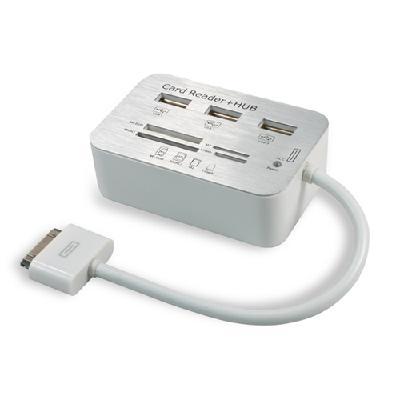
Free Shipping USB Card Reader + USB Hub COMBO For Apple iPad Series Camera Connection Kit
Product Description
Camera Connection Kit USB SDHC Card Reader + USB Hub COMBO For Apple iPad Series Free Shipping
With the iPad camera connection kit. You can easy download the photos from digital camera to your iPad and share them with your family and friends.
The kit has two connectors, each with a different interface. The camera connector features a USB port and its supports external keyboard.
Using the SD (HC) , MS DUO, M2, T-Flash card readers imports photos from your camera's memory cards. Connecting it to your iPad then insert your digital camera's memory cards into the slot and USB 2.0 3-port Hub. Your iPad automatically open the photos after you making a connection. iPad and the camera connection kit supports JPEG, RAW and so on.
When the current of device over iPad output power. Please use iPad USB adapter
Overview:
3*High-Speed USB Hub + Camera Connection Kit + SD/ MMC/ MS Card Reader Combo Kit for iPad/ iPad 2
Supports SD (HC) , SD (XC) , Mini SD, MMC, MMC 4.0, MS, MS Pro, MS Duo, MS Pro Duo, MS Duo MagicGate, M2, Micro SD/ T-Flash card
3 High-Speed ports of USB hub for all USB devices connecting to iPad
Can connect any large current USB devices; such as camera; keyboard; mobile harddisk etc
All USB devices connected with iPad working at the same time
Your iPad automatically opens the photos after you making a connection, which lets you choose the pictures you wanted to import.
When sync iPad to your PC or Macbook, the photos are added to your PC photo library
JPEG, RAW and more formats are supported
Compatible with Apple iPad/ iPad 2
Specification:
Weight Approx: 75.9g
Size Approx: 24 x 5 x 2.6 cm
What's in the package:
1xCombo kit
1xUSB charging cable
1xInstruction book
1, 支持SD (HC) /TF/ MS/ M2卡内照片导入iPad
2, USB口可接相机/ 键盘/ U盘等
3, 支持大电流USB设备/ 大电流存储卡
4, 支持Apple原装键盘
5, 支持多个USB设备同时在iPad上使用
读卡/ 相机使用说明
提示IPAD不支持此配件: 一般是插头未插到位引起的. 插上后都会提示, 不用管, 点关闭即可. 不影响使用!
DCIM文件夹: 相机用的卡一般都有DCIM文件夹; 文件夹内照片会自动弹出; 提示导入!没有的可自己在根目录建立该文件夹; 需要读取的照片放在文件夹内即可直接读取!如已越狱; 可在ifile里面找到卡目录; 如未越狱; 必须要有DCIM文件夹!
U盘/ 移动硬盘使用说明
将u盘通过读卡器接ipad; ipad会提示不支持此配件; 不用管; 点dismiss就可以 (有的版本是关闭, OK或者好) !
未越狱的需要建立DCIM文件夹; 越狱的直接打开ifile; 可以发现左侧有一个闪盘盘符; 可直接打开或者跳转目录到/ mnt (有的系统在VAR目录下) ,可以发现多了一个mount1的目录; 该目录就是u盘; 点击目录; 可以看见U盘上的所有文件; 即可拷贝U盘上的文件到ipad任何目录了
U盘上有word文档file.doc怎幺拷贝到ipad, 用pages浏览: 第一步: 将U盘接好, 然后用ifile到/ mnt/ mount1目录下复制文件file.doc!第二步: 目录转到/ var/ mobile/ Applications目录, 通常ipad的软件都安装到该目录, 该目录里边是ipad转换过的, 都是些字符串, 点击任何一个目录进去, 通过*******. app子目录可以知道该目录是哪个软件的, 我的ipad的pages软件对应的目录是4763052A. . . . . 第三步: 将文件拷贝到该目录下边的子目录Documents, 这样, 启动pages, 在我的文件里边就可以看见file. doc文件了, 其他软件都类似, 只要拷贝文件到对应的目录下边的documents目录就ok了!
如果连接U盘; 不能正常读取; 可按以下两步解决: 4.1, 如果提醒'配件不可用. . 耗电量太大', 是读不了的, 可外接HUB供电解决!如果是购买的HUB读卡器接上电源线即可!4.2, 如果插上没有任何反应 (排除接触不良) ,在iFile里也看不到数据 (但应该可以看到一个'Flash Drive'的设备, 当然也有可能看不到) ,估计是U盘格式不对, 可以考虑按以下方法: 将U盘连接电脑, 右击U盘, 选取'格式化. . . , 格式一定要选'Fat32'一定记得点击'还原设备的默认值'按钮, 格式化完毕, 复制数据, 重新测试.
其它外接设备使用说明
外接IPHONE/ IPOD; 需要与IPAD同版本; 同样需要越狱在ifile里在读取!
外接移动硬盘; 支持100G以下需要外接供电; FAT32格式; 分区不得大于32G; 支持部分移动硬盘; 容量较大反应稍慢; 请耐心等待!
外接其他设备时; 没反应的是耗电量过大; 无法使用!

&img=www.atupapa.com/show/wxbuyer/img/apk.png&url=//www.atupapa.com/show/wxbuyer/whatnear.apk)