幻影 USB 双 | 震动 | 手柄 | 游戏
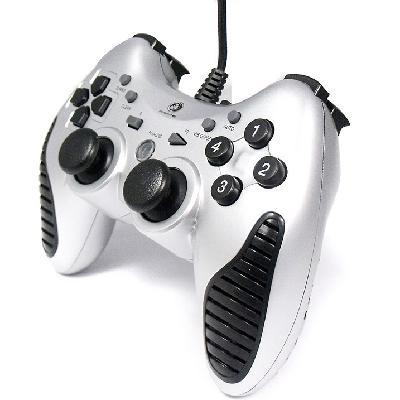
Dual Shock USB PC Controller Game pad Joypad Joystick
Specifications:
- Product style: game pad, joy pad
- Main color: black
- Model: MB-2143
- Brand: Mingpin
- Certificate: CE; FC; RoHS
- USB wire length: about
Features:
- USB port, plug and play
- With Digital mode and Analog mode
- Individual turbo Set/ Clear buttons
- Two internal motors provide maximum vibration feed back
- With dual shock function
- 12 Fire Buttons and 2 analog sticks
- Supporting multi-players game
- Compatible with USB 1.0/1.1/2.0
- Support mouse progam function
- Fully compatible with 98/ ME/ 2000/ XP/ vista
- Automatically adjust central axis of the joypad
- Support DirectX 9.0 or above
- Suitable for street fighters, adventure and flights games
System requirement:
- Microsoft Windows 98/ ME/ 2000/ XP/
- CPU: 233MHz or above.
- Memory:
- Main board: With USB port.
- CD Driver: CD or DVD –ROM
Package Included:
- 1 X USB Dual Shock Game Pad Controller
- 1X Driver Disc
Quick installation Guide
- Connect the joypad to your PC.
- Directx 9.0 or above version required if programming function needed;
- Install the driver.
- Go to Control Panel -) Game Controllers. Verify that device USB Dual Vibration Joystick is installed, calibrate the joypad. Have fun with your joypad.
- Turbo: Press this button and the button you wish to set to turbo mode at the same time.
- Clear: Press this button and the button you wish to release from turbo mode at the same time.
- Analog: Press this button, set the joypad to ANALOG mode (LED tum on) . On the contrary, when the LED is off, the joypad is under DIGITAL mode. Under DIGITAL mode, POV, button 11, button 12 Z axis & Slider axis are disabled.
MB-2143 风扇透气手把 USB 双震动手柄
主要参数:
` 产品类型: 游戏手柄
` 型号: MB-2143
` 产品颜色: 银色+黑色
` 使用范围: PC
` 接口类型: USB
` 系统配置要求: 支持WIN98; ME; 2000; XP; vista操作系统;
` 品牌: 明品
` CE; FC; RoHS认证
产品特点:
` 人体工学设计, 超强风扇透气防汗握把
` 双马达强劲震动功能
` 双摇杆设计+12火力键
` Slow自动键+视野切换功能
` 支持鼠标编程
` 兼容 Windows 982000; ME; XP & Vista操作系统
` 自动校准手柄轴中点
` 支持 USB 1.01.12.0
` 支持 Directx 9.0 或更高版本指令
` 支持 Microsoft 各种操作系统中所有支持DirectX的力回馈游戏
快速安装指南
-
1. 将手柄与您的电脑USB端口相连;
2. 安装Directx 9.0或以上版本软件;
3. 安装附带驱动程序, 根据提示安装; 籢
4. 进入控制面板 -) 游戏选项. 您将发现 USB Dual Vibration Joystick 已安装, 即可使用.
Analog: 按此键, 手柄将切换至模拟模式 (指示灯亮) ,反之, 手柄在数字模式下工作 (指示灯灭) .在数字模式下, POV, 11/12键, Z轴和slider轴都无功能.

&img=www.atupapa.com/show/wxbuyer/img/apk.png&url=//www.atupapa.com/show/wxbuyer/whatnear.apk)