18650 3000毫安充电锂电池4节
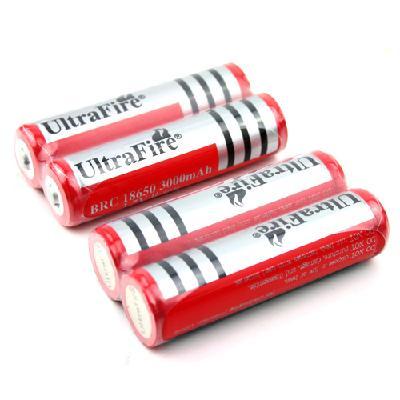
项目细节
型号:18650
品牌:非品牌/通用
化学成分:锂
数量:4
技术参数:
- 18650锂充电电池
- 更高的能量密度和较低的重量比其它类型的锂充电电池
- 建立移动电源装置需要高能量密度和低体重
- 保护电路连接到这些锂充电电池,以确保您不会过充或过放他们。
- 容量:3000mAh的
- 电压:3.7V
- 尺寸:为68×18毫米(长x直径)
如何选择可充电电池:
购买充电电池可以节省你在短时间内大量的资金。 如果您使用的技术工具,如数码相机和掌上游戏机,充电电池几乎是必须的。 你不仅可以节省资金使用充电电池,但你也可以节省毒素的量的电池进入垃圾填埋场。
电池类型:
- 选择镍氢(NiMH)电池的高容量收费。 虽然你可以购买D型电池是可充电的,规模较大的电池不持有其充电,以及更小的AA和A电池做。 虽然这些镍氢电池充电保持相当长一段时间,你不应该依赖于它们的如烟雾探测器或手电筒项目,因为他们失去了充电随着时间的推移他们是否习惯与否。 镍氢电池可以有多项指控在他们的一生,但最好让电池耗尽之前,你不是反复使用一个新的充电一流赶走向他们收取相当。 大多数电子设备自己关闭损坏电池之前,虽然手电筒可以让跑下来到一个地步,电池可能不再需要充电的充电电池。
- 你仍然可以找到旧的镍镉(NiCd)电池供电,但要避免购买它们。 该技术主要针对镍氢电池及其改进电荷保持能力超过证明成本的差异。
- 用于长期储存容量的电池选择较新的低自放电(LSD)镍氢电池。 充电后,这些镍氢电池具有相同的保质期为碱性电池。 这些电池是在所有的尺寸,但所述的AAA和AA尺寸更常见大于C,D和9伏大小。
电池容量:
- 寻找电池具有较高的毫安小时(毫安时)的评级。 这是指电的在任何给定时刻传送的量。 电子设备可以处理的范围内的毫安,而不会损坏该装置。 因此,作为充电电池开始失去动力,他们这样做对设备没有损伤。 电池具有较高毫安时可能看起来完全一样具有较低毫安时的电池,但通常他们的成本。
电池充电器:
- 购买适合您的需求的电池充电器。 在某些情况下,你可以购买充电器和电池作为一揽子交易,但如果你想你的电池充电器的正确维护您的充电电池,你可能需要付出更多的特殊功能。
- 寻找一个电池充电器充电的各种电池尺寸。 选择具有一个再生循环的单元。 这样可以使你从多收你的电池。 有些型号自动执行此操作,而另一些则必须翻转进入修复模式的开关。
如何延长电池寿命:
- 电池记忆 - 当我第一次拿到我的新手机,我的朋友建议充电之前充分耗尽电池。 他的理由是连接到电池的记忆的想法。 让电池完全放电,然后再充电至最大,理应给你完整的电池容量。 否则,如果单纯从中途点到最大的电池容量充电时,电池会对待中途点为空点,从而减少你的电池容量减半
- 电池校准 - 有一些好处定期完全放电电池,笔记本电脑这个可能是特别重要的。 如果你开始注意到你的电池计量器变得越来越不准确的,它可能是时间对于一些电池校准。 让你的电池完全耗尽,然后充电,直到电池充满一次。 这将校准电池让您更准确的读数
- 热火的后果 - 电池寿命的另一个敌人是热。 如果你要离开你的笔记本电脑插上电源并运行了一年,你应该期望的电池容量是它的最大原始容量为%%之间的任何地方60到80。 这就是为什么使用自己的笔记本电脑作为台式机替代品的人会使用一年后发现大大降低电池的续航表现。 这个问题可以通过同时使用有绳电源取出电池来解决
- 电池储存 - 如果你不使用你的电池长时间计划,那么你想减少电量水平为40%,并把电池放进冰箱(冰柜没有)。 存放电池在充电100%的水平适用不必要的压力,并可能导致内部腐蚀。 另一方面,如果充电太低,电池可以成为永久无法使用时,由于电池的自放电。
注意:
- 强烈建议您使用受保护的电池,它可以真正保护您的电池好,延长电池寿命,以及避免过充电和过放电的电池
- 我们不负责破碎的电池和充电器为您的用户错误的使用方法
- 对已在存储数周或数个月将失去功率和需要充电电池在使用前被再充电。
套餐包括:
- 4个锂离子充电电池
Item specifics
Type: 18650
Brand: Unbranded/ Generic
Chemical Composition: Lithium
Quantity: 4
Specifications:
- Lithium 18650 rechargeable batteries
- Higher energy density and lower weight than other types lithium rechargeable batteries
- Building portable power device needing high energy density and low weight
- Protection circuits are attached to these lithium rechargeable batteries to ensure that you do not overcharge or over discharge them.
- Capacity: 3000mAh
- Voltage: 3.7V
- Dimensions: 68 x 18mm (L x Dia.)
How to Choose Rechargeable Battery:
Buying rechargeable batteries can save you a lot of money in a short amount of time. If you use technology gadgets such as digital cameras and handheld games, rechargeable batteries are almost a must. Not only can you save money by using rechargeable batteries, but you can also save on the amount of toxins from batteries that go into landfills.
Types of batteries:
- Pick nickel metal hydride (NiMH) batteries for high-capacity charges. Although you can purchase D batteries that are rechargeable, the larger batteries don't hold their charge as well as smaller AA and A batteries do. While these NiMH batteries stay charged for quite a while, you shouldn't depend on them for items such as smoke detectors or flashlights because they do lose their charge over time whether they get used or not. NiMH batteries can have numerous charges over their lifetime, but it's best to let the batteries run down before you charge them rather than repeatedly topping them off with a new charge. Most electronic devices shut themselves off before damaging the batteries, although flashlights may let the rechargeable batteries run down to a point where the batteries may no longer take a charge.
- You may still find older nickel-cadmium (NiCd) rechargeable batteries, but avoid purchasing them. The technology for the NiMH batteries and their improved charge-holding capacity more than justifies any differences in costs.
- Select the newer low self discharge (LSD) NiMH batteries for a battery with long storage capacity. Once charged, these NiMH batteries have the same shelf life as alkaline batteries. These batteries are available in all sizes, but the AAA and AA size are more common than the C, D and 9-volt sizes.
Battery Capacity:
- Look for batteries with a higher milliampere hour (mAh) rating. This refers to the amount of electricity delivered at any given moment. Electronic devices can handle a range of mAh without damaging the device. So as the rechargeable batteries begin to lose power, they do no damage to the device. Batteries with a higher mAh may look exactly like a battery with a lower mAh but typically they cost more.
Battery Chargers:
- Buy the battery charger that suits your needs. In some instances you can purchase the charger and batteries as a package deal, but if you want your battery charger to maintain your rechargeable batteries properly, you may need to pay more for special features.
- Look for a battery charger that recharges a variety of battery sizes. Select a unit that has a reconditioning cycle. This keeps you from overcharging your batteries. Some models do this automatically while others have a switch you must flip to go into reconditioning mode.
How to Extend Your Battery Life:
- Battery Memory - When I first got my new cellphone, my friend recommended to fully drain the battery before recharging it. His reasoning was connected to the idea of battery memory. Allowing the battery to fully discharge then recharging to max, supposedly gives you the complete battery capacity. Otherwise, if you simply charged from the half way point to max battery capacity, the battery would treat the half way point as the empty point, thus cutting your battery capacity in half
- Battery Calibration - There are some benefits to fully discharging your battery periodically, for laptops this can be especially important. If you start to notice your battery meter becoming more and more inaccurate, it may be time for some battery calibration. Allow your battery completely drain, then charge until the battery is full again. This will calibrate your battery giving you more accurate readings
- Consequences of Heat - Another enemy of battery life is heat. If you were to leave your laptop plugged in and running for a year, you should expect the battery capacity to be anywhere between 60% to 80% of it's original max capacity. This is why people that use their laptops as desktop replacements will notice greatly reduced battery life performance after one year of use. This issue can be resolved by removing the battery while using a corded power source
- Battery Storage - If you don't plan on using your battery for prolonged periods of time, then you'll want to reduce the charge level to 40% and place the battery in the fridge (not freezer) . Storing the battery at 100% charge level applies unnecessary stress and can cause internal corrosion. On the other hand, if the charge is too low, the battery can become permanently unusable, due to battery self discharge.
Note:
- Strongly suggest you use the protected battery for it can really protect your battery well and extend your battery life as well as avoid the over-charging and over-discharging of your battery
- We are not responsible for the broken of the battery and charger for your users wrong using methods
- Rechargeable batteries that have been in storage for weeks or months will lose power and need to be recharged before being used.
Package Included:
- 4 x Lithium Rechargeable Batteries

&img=www.atupapa.com/show/wxbuyer/img/apk.png&url=//www.atupapa.com/show/wxbuyer/whatnear.apk)