高清USB3.0转VGA显卡2048*1152 USB TO VGA转换器外置
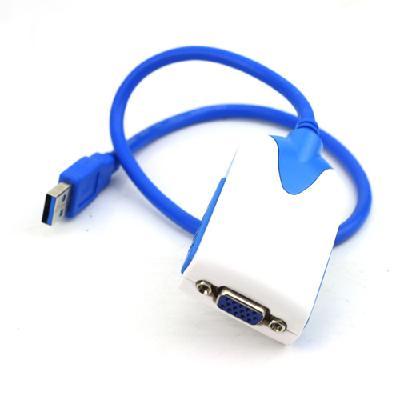
USB3.0 to VGA Video Graphic Extend Mirror Multi-Display Adapter 2048x1152 Win7
Features:
The USB 3.0-VGA display adapter enables you to connect additional display devices to your desktop or notebook PC. The connected display can act as mirrored or extended desktop of the main display on your PC.
The flexibility of the common USB 3.0 technology saves the need to open the computer or struggling with compatibility issues related to the VGA card.
Operates at a high resolution of 2048 x 1152
Support Function:
1. Primary
2. Extended
3. Mirror
4. Display rotation
5. Identify Monitor
6. Multi-Display
Input: USB3.0
Output: VGA
Resolution up to:
-UXGA: 1600 x1200
-WSXGA+: 1680 x 1050 / 1920 x 1080 / 2048 x 1152
Simple to install and use
Mirror or extend a computer display workspace
Enjoy resolutions:
-2048 x 1152
-1920 x 1080
-1600 x 1200 1680 x 1050
-1440 x 900 1400 x 1050
-1360 x 768
-1280 x 1024 1280 x 960 1280 x 800 1280 x 720 1280 x 768
-1152 x 864
-1024 x 768
-800 x 600
Allows for effortless multitasking
Windows 2000/ XP/ Vista / Win7
System requirements:
-Available USB3.0/2.0 Hi-speed port
-Windows 2000/ XP/ Vista/ 7
-CPU: Intel/ AMD single Core 1.5GHZ or Higher processor
-RAM: 512MB memory or higher
Size: 75 x 40 x 20 mm / 2.925 x 1.56 x 0.78 inch
Color: White with blue
Cable length: about 45cm
Package Included:
1XUSB Display Adapter
| USB3.0转VGA 显卡2048*1152 升级新品 是否发现你现在花了相当多的时间在切换不同视窗与剪贴, 比对不同画面呢?要提升工作有效果除了透过多核心让电脑跑的更快, 其实你还可以将电脑接上第二个屏幕或第三个屏幕, 让你工作能量倍增. USB3.0 to VGA能让电脑轻易的连接, 增加显示设备来延伸桌面的工作空间. 使用USB3.0外接显示卡搭配简易的操作介面, 可切换4种显示模式 (延伸/ 同步/ 主副屏切换/ 旋转) ,一台电脑最多可接6个外接显示屏, 让你轻松成为多屏幕达人, 可支持2048*1152. 可以旋转显示屏幕显示为左, 右或倒转. 使用USB3.0 to VGA简单快速连接. 安装使用简单, 小而灵活的为桌面或笔记本电脑快速添加6个显示窗口, 而不需要外加图形卡, 镜像或扩展您的电脑显示工作区域.. 畅享大分辨率或宽屏方案: 最大支持2048*11521920*1080 USB2.0/3.0超级低功耗技术, 无损压缩技术, 支持WINDOWS VISTA AERO, 支持WINDOWS XP和VISTA以及windows 7操作系统. 同时支持六个显示, 从容面对多窗口任务处理 (不用来回在窗口间切换了) 不需要额外电源 应用领域: 可用于工业或商业应用: 如投影机, POS系统等. (家用或办公) 用双显示器打开一个超出一个屏幕大的EXCEL表格, 提高多任务处理效率, 不用重叠窗口; 当您读Email的时候, 在另一个窗口中打开附件内容. (移动一族) 当需要多显示器显示的时候, 不用再背一台电脑了. (图形工作) 用第二个窗口作为工具 (数据录入) 参看另一个屏幕资料来录入数据 (金融股票) 用笔记本的时可以多个显示屏; 在同一时间观察实时动态数据; 避免错失良机 (一边?葱星?, 一边看资料) (娱乐使用) 一个工作, 用另一个屏幕播放网上RMVB电影 | |||||

&img=www.atupapa.com/show/wxbuyer/img/apk.png&url=//www.atupapa.com/show/wxbuyer/whatnear.apk)