五合一读卡器 | 相机套件+AV视频线 | 套装
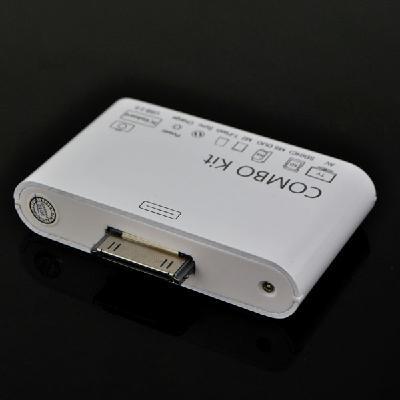
COMBO Kit Connection SD Card Reader + USB AV Cable for Apple iPad 2
With this 5-in-1 Camera Connection Kit, it's incredibly easy to download photos from your digital camera to your iPad 1/2. It gives you two ways to import photos and videos. One is using USB cable, another one is reading from SD/ Micro SD card directly. You can view them on the gorgeous Apple iPad 1/2 and share them with your family and friends!
Moreover, it supports the video output from iPad directly to the TV; it can also support data synchronism & charging through a mini USB cable. These two functions are also available for Apple iPhone/ iTouch/ Nano/ Classic!
Descriptions:
5-in-1 Camera Connection COMBO Kit Card Reader for your Apple iPad/ iPad 2 ONLY!
Support to upload the photos to iPad from the memory card (SD/ MS/ M2/ TF) .
Support to upload the photos from camera/ the keyboard/ the iPhone/ iPod to iPad via USB interface.
Support (ipad/ iphone/ ipod) online video output and photo phantom high-definition playback.
Support PC Sync & USB Charge
Support Play video while charging.
With Led Indicator show the actual working status
Support: MS DUO; SD; SDHC; MMC; MMC2; RS MMC; SD; TF (micro-SD) card! (BUT not support upload at the same time)
Features:
-100% brand new and high quality
-Lightweight and slim design, easy to take and use
-Send audio & video from iPad to TV; this function is apply to your iPad/ iPhone/ iPod Touch/ Nano/ Classic
-Import photos from SD Card to iPad (not for iPhone/ iPod) , support standard photo formats, such as JPEG and RAW, etc.
-Besides, it supports PC keyboard input as well as import photos from USB flash disk to iPad
-Sync data & charger through a micro USB data cable; this function is apply to your iPhone/ iPod Touch/ Nano/ Classic
-Power by iPad/ iPhone/ iPod without external power supply, just plug and play
-With its Metal surface, it won't be easily scratched by other sharp objects
-DO NOT support the movies that were purchased through iTunes or locked with Apple's Fairplay copy protection scheme
-DO NOT support to display internet web pages on TV
-Color: White
-Dimension: Approx. 68 x 40 x 14 mm
-AV Cable length: Approx. 146cm
-USB Cable length: Approx. 80cm
Package includes:
1 x 5-in-1 COMBO Kit Card Reader for Apple iPad
1 x AV Cable
1 x USB Cable
五合一读卡器 相机套件+AV视频线 套装
iPad Camera Connection Kit, 连接任何数码相机.
※Camera Connection Kit 可使你有两种方法从数码相机导入照片和视频. Camera Connector 可使使用数码相机的 USB 线缆将你的照片和视频导入至 iPad. 或者, 你也可以使用 SD / MS/ TF等读卡器直接从相机的 SD 卡导入照片和视频.
※此款为USB口和读卡器二合一 (读卡器可以读市面上五种常见的记忆卡) 功能结合; 为第三代产品; 采用原装芯片; 可以连接相机; 也可以读卡; 比原装的还要先进
※ 支持外接设备: SD.TF.MS.SDHC.MMC.M2卡, 相机, U盘, 键盘, 移动硬盘, 部分读卡器, 电视, 电脑 (充电) !
iPad Camera Connection kit目前实现的十大功能
1. 利用USB配件可以直接将数码相机中的照片导入, 非常方便和快捷. 利用SD/ MS/ TF配件可以读取卡中的照片和视频文件 (注意照片文件一定要存放在DCIM目录下)
2. 可以利用USB配件外接U盘
3. 外接移动硬盘
4. 利用USB配件连接iphone后会将iPhone内的照片自动导入到ipad内, 这时你利用iphone拍照得到的照片也会立刻显示在ipad上.
5. 利用USB配件连接ipod, 不能自动导入照片, 但可以通过ifile VAR 中找到mnt文件夹里的ipod音乐.
6. 利用USB配件可以连接USB HUB, 但需要有外接供电.
7. 有朋友提到是否可以连接相机后, 一边拍照一边导入照片, 测试是不行, 因为相机连接后会进入USB连接模式, 无法启动照相功能.
8. 有线键盘插上KIT, 竟然键盘可以用, 而且可以在任何需要输入的地方打字.
9. 测试连接读卡器成功, 现在不光能读SD/ MS/ TF卡了!!
10. 连接USB风扇成功, 清爽过夏天.
※ IPAD使用u盘的方法:
1 ipad破解 (没破解的未试过)
2 安装ifile
3 有相机接口套装
U盘连接问题与解决:
如果连接U盘; 不能正常读取; 可按以下两步解决:
1 ,如果提醒'配件不可用.. 耗电量太大', 基本上不要再试了, 应该是没法直接读的, 可考虑接HUB再接U盘.
2 ,如果插上没有任何反应 (排除接触不良) ,在iFile里也看不到数据 (但应该可以看到一个'Flash Drive'的设备, 当然也有可能看不到) ,估计是U盘格式不对, 可以考虑按以下方法:
2.1 ,将U盘连接电脑
2.2 ,右击U盘, 选取'格式化...'
2.3 ,格式一定要选'Fat
2.4 ,格式化完毕, 复制数据, 重新测试.
方法:
1 将u盘通过套装接ipad; ipad会提示usb设备不被支持; 不用管; 点dismiss就可以
2 打开ifile; 目录跳转到/ mnt; 可以发现多了一个mount1的目录; 该目录就是u盘; 点击目录; 可以看见u盘上的所有文件这样; 可以拷贝u盘上的文件到ipad任何目录了
例子:
u 盘上有word文档file.doc怎幺拷贝到ipad, 用pages浏览
1 ) 将u盘接好, 然后用ifile到/ mnt/ mount1目录下复制文件file.doc
2) 目录转到/ var/ mobile/ Applications目录, 通常ipad的软件都安装到该目录, 该目录里边是ipad转换过的, 都是些字符串, 点击任何一个目录进去, 通过*******. app子目录可以知道该目录是哪个软件的, 我的ipad的pages软件对应的目录是
3) 将文件拷贝到该目录下边的子目录Documents
这样, 启动pages, 在我的文件里边就可以看见file.doc文件了
其他软件都类似, 只要拷贝文件到对应的目录下边的documents目录就ok了
反过来操作, 就可以复制文件到u盘了
其它外接设备使用说明
1. 外接IPHONE/ IPOD; 需要与IPAD同版本; 同样需要越狱在ifile里在读取!
2. 外接移动硬盘, 支持
3. 外接键盘或者读卡器, 没反应的是耗电量过大, HUB读卡器可外接电源解决, 其它的无法使用!

&img=www.atupapa.com/show/wxbuyer/img/apk.png&url=//www.atupapa.com/show/wxbuyer/whatnear.apk)