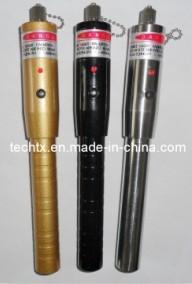
pen-type visual fault locator
笔式可视故障定位仪
议价
加入意向 650系列光纤故障定位仪
我们使用MWQ-LD作为650系列光纤故障定位仪的发光元件。
驱动由恒定电流源,该指示器能发出稳定的红色激光。
该产品可用于检测光纤故障时,他们与连接
光接口和被插入到单模或多模
光纤。 它是在纤维项目施工不可缺少的工具。
光纤网维护工作,光学部件的制造和研究。
驱动由恒定电流源,该指示器能发出稳定的红色激光。
该产品可用于检测光纤故障时,他们与连接
光接口和被插入到单模或多模
光纤。 它是在纤维项目施工不可缺少的工具。
光纤网维护工作,光学部件的制造和研究。
技术参数:
波长光源的:650 + 10纳米
适用光纤类型:单模或多模
输出功率单模:10毫瓦
电源:2节1.5V电池
电源连续工作时间:≥20小时
工作温度:10〜+ 60℃(不结露)
储存温度:-40〜+ 85℃
壳的材料:铜合金或不锈钢
外形尺寸:φ24*170毫米(不含接口)
外部结构:
1-防尘盖-2-光接口-3-头的指示器的
4-LED 5开关6体7尾
用法:
1.拧开尾,然后把两节1.5V电池到尾。 (注意:阳极的电池指向定位器的底部。
电池阴极接触定位器的阴极)。
电池阴极接触定位器的阴极)。
2.将身体与尾巴,和开放的防尘帽,然后按
开关。 你会看到红色激光从光纤接口发射。
同时,LED将点亮(请不要盯着光束。
以免损害你的眼睛)的。
开关。 你会看到红色激光从光纤接口发射。
同时,LED将点亮(请不要盯着光束。
以免损害你的眼睛)的。
3.按下开关一次,发光的变化为脉冲模式,而LED具有发光(脉冲频率在0.5〜2.0赫兹将被控制)同步。
4.按下开关一次,光源将关闭,且有
没有更多的光。 同时,LED熄灭(切换循环模式:连续脉冲关)。
没有更多的光。 同时,LED熄灭(切换循环模式:连续脉冲关)。
5.您应该插入要检查到光学纤维
界面,然后按下开关来选择光源的工作模式
(连续或脉冲)。
界面,然后按下开关来选择光源的工作模式
(连续或脉冲)。
6.当您完成检查,请拧上防尘帽。 如果你
不要使用很长一段时间的指标,必须取出电池。
在这情况下,电池腐烂,破坏光源。
不要使用很长一段时间的指标,必须取出电池。
在这情况下,电池腐烂,破坏光源。
保养及注意事项:
1.激光是有害的,所以特别是,你必须保护你的眼睛。
当LD工作时,请不要让你的眼睛受到激光。
当LD工作时,请不要让你的眼睛受到激光。
2.通常,较高的温度是,越短是对LD的寿命。
当您使用它避免高温。
当您使用它避免高温。
3.光纤头部必须及时清理LD工作一段时间。
4.如果不使用此光源,请拧上的情况下防尘盖
该灰尘落入。
该灰尘落入。
5.取出电池,当你不使用它。
650 series fiber fault locator
We use MWQ-LD as the emitting component of 650 series fiber fault locator.
Driven by constant current source, the indicator can emit stable red laser.
The product can be used to inspect fiber failure when they connect with
optical interface and be inserted into single mode or multi mode
optical fiber. It is indispensable tool in fiber project constructing.
fiber net-work maintaining, optical component manufacture and research.
Driven by constant current source, the indicator can emit stable red laser.
The product can be used to inspect fiber failure when they connect with
optical interface and be inserted into single mode or multi mode
optical fiber. It is indispensable tool in fiber project constructing.
fiber net-work maintaining, optical component manufacture and research.
Technical parameter:
Wavelength of optical source: 650+10nm
Applicable fiber type: single mode or multi mode
Output power in single mode: 10 mW
Power: two 1.5V batteries
Continuous working time of power: ≥20 hours
Working temperature: 10~+60℃ (not dewing)
Storage temperature: -40~+85℃
Material of the shell: Cu-alloy or stainless steel
Dimension: φ24*170mm (without interface)
Outer structure:
1-dust cap 2-optical interface 3-head of the indicator
4-LED 5-switch 6-body 7-tail
Usage:
1. Screw off the tail, then put two 1.5V batteries into the tail, . (Caution: anode of batteries point to bottom of the locator.
cathode of batteries contact cathode of the locator) .
cathode of batteries contact cathode of the locator) .
2. Connect the body with the tail, and open dust cap, then press
the switch. You will see the red laser emitting from the optical interface.
at the same time, LED will be lighted up (Please don't stare at the beam.
for fear of damaging your eyes) .
the switch. You will see the red laser emitting from the optical interface.
at the same time, LED will be lighted up (Please don't stare at the beam.
for fear of damaging your eyes) .
3. Press the switch again, light-emitting changes to pulse mode, and LED synchronize with light-emitting (pulse frequency will be controlled at 0.5-2.0 Hz ) .
4. Press the switch again, the optical source will shut, and there is
no more light. Meanwhile, LED put out (Switching cycle mode is: continuous-pulse-shut) .
no more light. Meanwhile, LED put out (Switching cycle mode is: continuous-pulse-shut) .
5. You should insert the fiber which you want to inspect into optical
interface, then press the switch to choose working mode of the light source
(continuous or pulse) .
interface, then press the switch to choose working mode of the light source
(continuous or pulse) .
6. When you finish the inspection, please screw on the dust cap. If you
don't use the indicator for a long time, you must take out the batteries.
in case that batteries rot and destroy light source.
don't use the indicator for a long time, you must take out the batteries.
in case that batteries rot and destroy light source.
Maintenance and attentions:
1. Laser is harmful, so especially, you must protect your eyes.
When the LD working, please don't let your eyes exposure to laser.
When the LD working, please don't let your eyes exposure to laser.
2. Generally, the higher is temperature, the shorter is life of the LD.
Avoiding high temperature when you use it.
Avoiding high temperature when you use it.
3. The head of fiber must cleared up while the LD operates.
4. If don't use this light source, please screw on the dust cap in case
that the dust fall into.
that the dust fall into.
5. Take out the batteries when you don't use it.

&img=www.atupapa.com/show/wxbuyer/img/apk.png&url=//www.atupapa.com/show/wxbuyer/whatnear.apk)