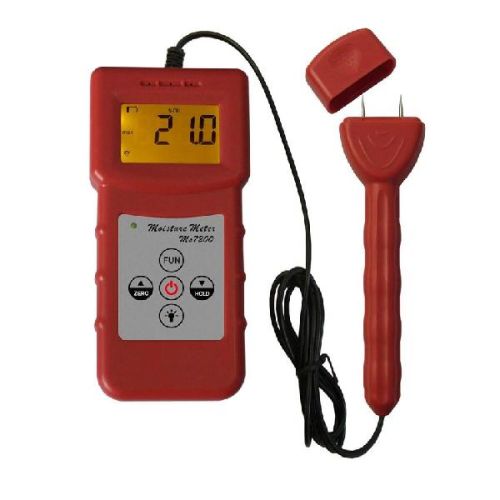
Portable Paper Moisture Meter MS7200
便携式纸张水分测定仪MS7200
议价
加入意向纸张水分仪MS7200 +用于测量纸管,纸箱,纸,纸板等纸相关材料的含水率。 它适用的木制品,造纸,刨花板,家具,建筑,木材贸易商及其他相关产业的发展。
1.特点
1.1,便携式紧凑,易于使用和湿度测量读数瞬间。
1.2数字显示带背光提供准确,清楚地阅读虽然你呆在阴暗的条件。
1.3这将节省时间和费用,通过监控干燥,有助于防止变质和腐烂造成的水分而在存储,因此处理将更加方便快捷。
1.4水分测定仪操作由电阻,具有自动温度补偿。
1.5手动关闭在任何时间。 自动关闭电源,从上次操作5分钟后。
1.6数据保持功能。 低电量警报。
2.规格
显示:4数字液晶
测量范围:0-95%
温度:0-60℃,
湿度:5%-85%RH
分辨率:0.1
精度:±0.5%N
操作:
电阻法,自动温度
赔偿金
电源:
4x1.5 AAA大小(UM-4)电池
尺寸:
主机:140毫米*60毫米*22毫米
传感器:175毫米*40毫米*20毫米
重量:
175克(不包括电池)
保证:一年
4.操作步骤
4.1打开电源键,符号0'will被显示在显示屏。 这将需要归零如果在探头传感器没有碰任何东西,或归零表现出其他价值,请depressZERO关键是效率不高。 归零可以减少从在空气中的温度和湿度的影响。
4.2用手抓住仪器,然后脱下sensorandinsert封面的探讨了材料直线时,探头越深,值更准确。
4.3踩下保持键,符号max'will可以显示对显示,然后测量过程时的最大值必须存储在显示。 再次按下保持键,此功能将被取消。
4.4Code选择
按下FUN键不放,直到CD00的表现进行展示,通过按UP and'DO'key来选择你需要的代码,然后压下FUN键确认。
4.5。 更换电池
当电池符号显示上显示,必须及时更换电池。 滑动电池盖,正确地把电池放入孔中。
5.警告设置
5.1按键按下3-9不松开,直到AL2显示在显示屏(它会需要5秒即可完成操作),thenpress UP键或DO键根据您的需要选择适合自己的值,按FUN键再次回 运转状态。
5.2设置AL1一样的方式为AL2“。
5.3一般情况下,AL2'must比AL1'大,如果AL2小于AL1设置过程中,仪器会返回出厂设置,只是说,AL1 = 13,AL2 = 18。
6.更换电池
当电池符号显示上显示,必须及时更换电池。 滑动电池盖,正确地把电池放入孔中。
笔记:
请取出电池,如果仪器不使用很长一段时间。
将探头在空气中不接触任何东西归零,或归零效率不高的时候。
代码表
码 | 参考资料 |
CD00 | 一般材料 |
CD01 | 硬纸板,纸箱 |
CD02 | 废纸捆 |
CD03 | 纸罐,纸管 |
CD04 | 高吸湿材料 |
Paper moisture meter MS7200+is used for measuring moisture content of paper tube, carton, paper, cardboard and other paper relevant materials. It applicable of woodwork, paper making , flakeboard, furniture , building, timber traders and other relevant industry.
1. FEATURES
1.1 It is portable, compact, easy to use and the moisture measurement readings are instant.
1.2 Digital display with back light gives exact and clearly reading although you stay at the somber conditions.
1.3 It will save time and expense by monitoring dryness and helps to prevent deterioration & decay caused by moisture whilst in storage, therefore processing will be more convenient and efficient.
1.4 The moisture meter operates by electrical resistance and has automatic temperature compensation.
1.5 Manual off at any time. Auto power off after 5 minutes from last operation.
1.6 Data hold function. Low battery alert.
2. SPECIFICATION
Display: 4 digital LCD
Measuring range : 0-95%
Temperature: 0-60°C
Humidity: 5%-85%RH
Resolution: 0.1
Accuracy: ± 0.5%n
Operation:
Electrical Resistance Method, Automatic temperature
Compensation
Power supply:
4x1.5 AAA size (UM-4) battery
Dimensions:
Main Unit: 140mm*60mm*22mm
Sensor: 175mm*40mm*20mm
Weight:
175g (not including batteries)
Guarantee: 1 year
4. OPERATION PROCEDURE
4.1 Turn on the power key, the symbol 0'will be showed on display. It will need zeroing if showed other value, please depressZERO key while the probe sensor without touch anything, or zeroing is not efficient. Zeroing can decrease the effect from the temperature and humidity in the air.
4.2 Hold the instrument with your hand, then take off the cover of the sensorandinsert the probes into the materials straightly , the probes are more deeper , the value is more accurate.
4.3 Depress Hold key, the symbol max'will be showed on display, then the max value must be stored on display when measuring process. Depress the Hold key again, this function will be canceled.
4.4Code choice
Depress FUN key and not release until the CD00 is showed on display, through press UP and'DO'key to choose you needed code, then depress FUN key to confirm it.
4.5. Replace batteries
When battery symbol showed on display, it must replace the batteries in time. Slide the batteries cover , put the batteries into the hole correctly.
5. WARNING SETTING
5.1 Depressing key 3-9 and don't release until AL2 showed on display (it will takes 5 seconds to complete operation) ,thenpress UP key or DO key to choose your suitable value according to your needs, press FUN key again back to the operation state.
5.2 Setting the AL1 just the same ways as AL2'.
5.3 Usually , AL2'must larger than AL1', if the AL2 less than AL1 during setting process, then the instrument will be returned back the factory setting, just to say, AL1=13, AL2=18.
6. Replace batteries
When battery symbol showed on display, it must replace the batteries in time. Slide the batteries cover , put the batteries into the hole correctly.
Notes:
Please take out the batteries if the instruments without use for a long time.
Put the probe in the air without touch anything when zeroing, or the zeroing is not efficient.
CODES TABLE
CODE | REFERENCE MATERIAL |
CD00 | General Material |
CD01 | Hard cardboard, Carton |
CD02 | bundles of waste paper |
CD03 | paper canister, paper tube |
CD04 | High hygroscopic material |

&img=www.atupapa.com/show/wxbuyer/img/apk.png&url=//www.atupapa.com/show/wxbuyer/whatnear.apk)