DA-Dongle J2534 (SAE J2534 Pass-Thru Interface) Jaguar & Land Rover
DA 转换器 J2534 (SAE J2534 传递接口) 捷豹和路虎
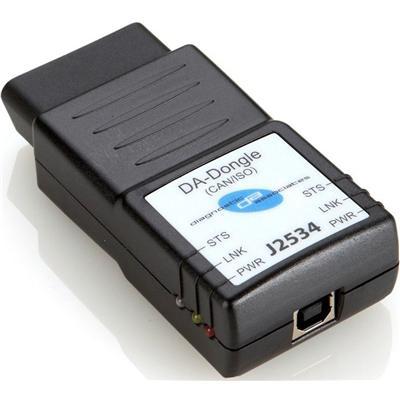
DA 转换器 J2534 (SAE J2534 传递接口) 捷豹和路虎
DA 转换器 J2534 是一种接口 (SAE J2534) 车辆低成本高性能传递。本单元直接连接到车辆 OBDII (诊断) 连接器;然后它会连接到任何便携式计算机通过 USB 2.0 电缆。一旦加载 J2534 驱动程序文件,该产品将允许与 OEM 兼容 J2534 诊断应用程序的正常运行。此设备支持可以,金融时报 》 可以,和 ISO 协议
DA 转换器 J2534 概述:
1.捷豹路虎批准的设备
2.更换为捷豹路虎 IDS / SDD VCM
3.封面可以,ISO9141 车网络
4.最经济实惠传递 VCI 设备
5.最适合当前和未来的车辆
6.12 英尺 USB 电缆作为标准包括
7、 易为 J2534 新功能更新更新
DA 转换器 J2534 捷豹和路虎汽车覆盖范围:
车辆 / 型号年 | MY05 | MY06 | MY07 | MY08 | MY09 | MY10 | MY11 | MY12 |
后卫 | - | - | 是的 | 是的 | 是的 | 是的 | 是的 | 是的 |
发现 / LR3 / LR4 | 是的 | 是的 | 是的 | 是的 | 是的 | 是的 | 是的 | 是的 |
揽胜运动 | - | 是的 | 是的 | 是的 | 是的 | 是的 | 是的 | 是的 |
路虎揽胜 | - | 是的 | 是的 | 是的 | 是的 | 是的 | 是的 | 是的 |
神行者 / LR2 | - | - | 是的 | 是的 | 是的 | 是的 | 是的 | 是的 |
Evoque | - | - | - | - | - | - | 是的 | 是的 |
XJ 新 | 是的 | 是的 | 是的 | |||||
XJ 老 | 是 * | 是 * | 是 * | 是 * | 是 * | - | - | - |
XK 新 | 是的 | 是的 | 是的 | |||||
XF 老 | 是 * | 是 * | 是 * | 是 * | 是 * | - | - | - |
XF | - | - | - | 是的 | 是的 | 是的 | 是的 | 是的 |
S 型 | 是 * | 是 * | 是 * | 是 * | 是 * | |||
X 型 | 是 * | 是 * | 是 * | 是 * | 是 * | |||
1.(是的) — — 所覆盖的我;2.(-)-N / A,3。(yes *)-只有 j1850 等 SCP 不支持 | ||||||||
做什么 DA 转换器 J2534?
DA 转换器 J2534 连接直接到车辆 OBDII (诊断) 连接器,然后通过 USB 电缆与 ID 一起使用的笔记本电脑 / SDD。J2534 DLL 文件加载后,该产品将允许正常运行与捷豹路虎 IDS / SDD 诊断工具。
这种装置可以用于捷豹路虎 IDS 绝大多数更换直通车通讯设备作为 / SDD 诊断应用程序。只有 SCP 通信是不可能的这种装置。
如何做 DA 转换器 J2534 在 J2534 模式下运行?
DA 转换器 J2534 设备是简单和容易使用。
1.从我们的 DVD 下载最新的 J2534 DLL 软件文件和安装这些对 ID / SDD 笔记本电脑。
2.J2534 设备连接到车辆 OBD II 连接器 (从车的设备权力)
3.12rg USB 电缆连接到 J2534 设备和 ID,另一端 / SDD 笔记本电脑。
4.红色汽车电源 (PWR) 指示灯会自动亮起,表明该设备通电。
5.在与该车辆的沟通,地位 (STS) 指示灯将呈绿色闪烁。
6.设备交互的方式与 ID / SDD 诊断工具在 th 一样存在氯乙烯。
联系爱丽丝
电子邮件: sales5@obding.com
Skype: herong54
手机: 86-13828801719
网站: www.obding.com
DA-Dongle J2534 (SAE J2534 Pass-Thru Interface) Jaguar & Land Rover
The DA-Dongle J2534 is a low cost high-performance pass-thru (SAE J2534) vehicle interface. This unit connects directly to the vehicle OBDII (Diagnostic) connector; it then connects to any laptop via a USB 2.0 cable. Once the J2534 Driver files are loaded, this product will allow normal operation with OEM compliant J2534 diagnostic applications. This device supports CAN, FT CAN, and ISO protocols
DA-Dongle J2534 Overview:
1. JLR approved device
2. Replacement for JLR IDS/ SDD VCM
3. Covers CAN, ISO9141 vehicle networks
4. Most cost effective pass-thru VCI device
5. Best suited for current and future vehicles
6. 12ft USB cable as standard included
7. Easy to update for J2534 new functionality updates
DA-Dongle J2534 Jaguar & Land Rover vehicle coverage:
Vehicle/ Model Year | MY05 | MY06 | MY07 | MY08 | MY09 | MY10 | MY11 | MY12 |
Defender | - | - | yes | yes | yes | yes | yes | yes |
Discovery/ LR3/ LR4 | yes | yes | yes | yes | yes | yes | yes | yes |
Range Rover Sport | - | yes | yes | yes | yes | yes | yes | yes |
Range Rover | - | yes | yes | yes | yes | yes | yes | yes |
Freelander/ LR2 | - | - | yes | yes | yes | yes | yes | yes |
Evoque | - | - | - | - | - | - | yes | yes |
XJ-new | yes | yes | yes | |||||
XJ-old | Yes* | Yes* | Yes* | Yes* | Yes* | - | - | - |
XK-new | yes | yes | yes | |||||
XF-old | Yes* | Yes* | Yes* | Yes* | Yes* | - | - | - |
XF | - | - | - | yes | yes | yes | yes | yes |
S type | Yes* | Yes* | Yes* | Yes* | Yes* | |||
X type | Yes* | Yes* | Yes* | Yes* | Yes* | |||
1. ( yes) - covered for MY; 2. (-) - N/ A, 3. (yes*) - only J1850 SCP not supported | ||||||||
What does the DA-Dongle J2534?
The DA-Dongle J2534 connects directly to the vehicle OBDII ( diagnostic ) connector and then to a laptop via a USB cable for use with IDS/ SDD. Once the J2534 DLL files are loaded, this product will allow normal operation with the JLR IDS/ SDD diagnostic tool.
The device is designed as a replacement pass-through vehicle communications device that can be used for the majority of the JLR IDS/ SDD diagnostic application. Only SCP communication are not possible with this device.
How does the DA-Dongle J2534 operate in J2534 mode?
The DA-Dongle J2534 device is simple and easy to use.
1. Download the latest J2534 DLL software files from our DVD and install these on the IDS/ SDD laptop.
2. Connect the J2534 device to the vehicle OBD II connector ( the device powers from the vehicle)
3. Connect the 12rg USB cable to the J2534 device and the other end to the IDS/ SDD laptop.
4. The red vehicle power (PWR) LED will illuminate to show that the device is powered.
5. During communication with the vehicle, the status (STS) LED will flash green.
6. The device interacts with the IDS/ SDD diagnostic tool in the same way as th existing VCM.
Contact Alice
Email : sales5@obding.com
Skype : herong54
Mobile : 86-13828801719
Website : www.obding.com

&img=www.atupapa.com/show/wxbuyer/img/apk.png&url=//www.atupapa.com/show/wxbuyer/whatnear.apk)