Wholesale Binocular 4 in 1 Digital Binoculars Camera telescope
批发双目4合1数码望远镜相机望远镜
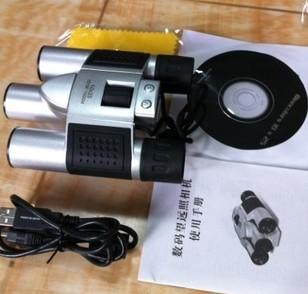
新的双目4合1数码望远镜相机望远镜30万个/ 25mm物镜望远镜combind用数码相机 图像传感器:300K CMOS传感器 16MB内存 望远镜+数码相机+数字视频+ PC凸轮 模式:数字视频录像(无声) - 仍然照片 -PC相机 解析度: -640×480(VGA) -320×240(QVGA) 存储容量: -VGA 25张图片,压缩76图片 -QVGA 100张图片,274压缩的图像 5倍伸缩式镜头 352x288pixels:(压缩)300frame AVI:9 FPS 电脑摄像头模式:VGA:640X480pixels QVGA:320x240pixels 显示方式:三位Digital'888ICON'Monochrome LCD显示器 计算机imterface:USB1.1 快门速度:1/4〜1/10000秒 视频帧率:5〜10帧(VGA),15〜25(QVGA) 镜头:固定,F =6.2毫米 对焦范围:20米〜无限远(常规) 光圈:F 208 功率控制:30秒无操作/手动电源开/关后自动关机 低电压报警:自动 双筒望远镜尺寸:8×21 文件格式:24位JPEG / AVI 取景器:光学 拍摄模式:单次/连续/自拍时间 自拍:10秒延时 曝光:自动 白平衡:自动 外形尺寸:96毫米(H)11毫米(W)49毫米(D) 系统要求对于PC:的Windows 98/2000 / ME / XP 1.不要将相机连接到计算机安装软件之前。 2.从相机下载图像前将电池放电,否则,图像将被自动删除。 3.仅使用优质的碱性电池。 4.如果您的计算机系统是WIN98我,你必须设置文件名E:/赢/ DIRECTX 8.1 b REDIST PACKAGE.EXE(E为光盘驱动器),你建立之前,数码相机的驱动程序progamme。 认证:CE / FCC 包: 1xcamera 1xCD 1xManual 1xData电缆 |
New Binocular 4 in 1 Digital Binoculars Camera telescope 300k/ 25mm objective lens binoculars combind with Digital Camera Image sensor: 300K CMOS sensor 16MB memory Binoculars + Digital Camera + Digital Video + PC Cam Modes: Digital Video Recording (no sound) -still photos -PC Camera Resolution: -640 X 480 (VGA) -320 X 240 (QVGA) Storage capacity: -VGA 25 images, compress 76 images -QVGA 100 images, compress 274 images 5x telescopic Lens 352x288pixels: ( Compressed) 300frame AVI: 9 fps PC Camera Mode: VGA: 640X480pixels QVGA: 320x240pixels Display: three Digital'888ICON'Monochrome LCD Display Computer imterface: USB1.1 Shutter Speed: 1/4 ~ 1/10000 seconds Video Frame Rate: 5~10 fps (VGA) ,15~25 (QVGA) Lens: Fixed, F=6.2mm Focus Range: 20m ~ infinity (Normal) Aperture: F 208 Power control: Auto power off after 30 seconds without operation / manual power on / off Low voltage alarm: Auto Binoculars Size: 8 x 21 File formats: 24 bits JPEG / AVI Viewfinder: Optics Shoot Mode: Single / Continuous / Self-time Self-Timer: 10 seconds delay Exposure: Automatic White balance: Automatic Dimensions: 96mm (H) 11mm (w) 49mm (D) System Requirement For PC: Windows 98 / 2000 / ME / XP 1. Do not connect the camera to the computer before the software is installed. 2. Download the images from camera before the battery discharged, otherwise, the images will be deleted automatically. 3. Use good quality alkaline batteries only. 4. If your computer system is win98 I, you must set up the document name E: /Win/ DIRECTX 8.1 b REDIST PACKAGE.EXE (E is CD driver) before you set up driver progamme of the Digital Camera. Approved: CE / FCC Package: 1xcamera 1xCD 1xManual 1xData Cable |

&img=www.atupapa.com/show/wxbuyer/img/apk.png&url=//www.atupapa.com/show/wxbuyer/whatnear.apk)