UK Plug Mobile Phone PDA Wireless Remote Control Smart Switch Memory High Power Intelligent Remote Control Socket Switch GSM
UK Plug Mobile Phone PDA Wireless Remote Control Smart Switch Memory High Power Intelligent Remote Control Socket Switch GSM
英式插头手机PDA无线远程控制智能开关存储大功率智能遥控开关插座GSM
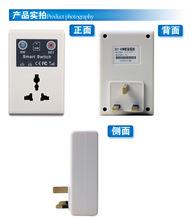
典型应用: 您可以通过控制环或短信的GSM交换机。 它可以控制热水器,电动机,电动门,灯,电饭煲等家用电器。 无论您是在路上还是在办公室,方便,低成本的控制远程设备:
用法: A,基本的设置和操作 1,上电后安装SIM卡安装电源,无安装上电后的SIM卡之前,您的SIM卡!一个短暂的初始化时间(20秒),相关的操作初始化后。 GSM的开关由默认断开。 2,等待的SIM卡连接GSM网络(根据本地运营商和信号电平,通常为约1分钟至进入网络),并观察SIG灯面板上(开始为1秒闪光),当闪光 变成4秒,证明已经进入GSM网络,那么你可以设置和控制相关的操作。 3,设置密码必须设置用户密码后,GSM切换初始密码为:0000 set password命令格式为:“SN +四旧密码+新+四个新的密码。 “例如,客户想要设置其密码为:”1234“,那么他应该编辑短信内容: “SN0000NEW1234”颁发给GSM的切换,如果你成功后,您会收到一条消息:“新的SN SETOK新SN 1234(新密码)。 '与掉电记忆功能的密码。 4,设置主数GSMSW-A1车主可设置5组的主号码,该SETING格式为:“SN + ****(密码)+ SET +主号”,发送到GSM交换机的数量,可以 设置主号码,如用户的密码是1234,尝试设置13788889999掌握号码,然后编辑短信内容:“SN1234SET13788889999”颁发给GSM的切换,如果成功,您将收到一条消息:“13788889999SETOK”。 只有主号可以控制出口按拨号,当GSM swithch的主号码拨号号码,开关状态将会改变,然后一秒钟后自动挂断,不产生任何费用。 主数字与掉电记忆功能。 5,振铃控制用户控制由拨GSM交换机的数量,当通过套接字状态改变得到和1秒后挂断在GSM交换机。 用户可以听到“你不能接听电话,提示音。 。 。 音等,即集已经成功。 如果交换机连接时,它会调用后变成断开状态。 如果原来的状态为关,打电话和改变到连接。 B,短信控制 1.短信切换开关状态:编辑信息“SN + ****(密码)+变”要发送到GSM swithc,可以改变的状态,在控制成功后,GSM交换机将返回当前状态。 (例如:密码是1234,编辑短信:SN1234CHANGE,发送到GSM切换) 2.手机短信查开关状态:编辑信息“SN + ****(密码)+检查”,以发送到GSM swithc,可以改变状态,当控制成功后,GSM交换机将返回当前状态。 (例如:密码是1234,编辑短信:SN1234CHECK,发送到GSM切换) 3.短信开启开关:编辑信息“SN + ****(密码)+ ON”,以发送到GSM swithc,可以 改变状态,当控制是成功的,GSM交换机将回到当前状态。 (例如: 密码为1234,编辑短信:SN1234ON,发送到GSM切换) 4.短信关闭开关:编辑信息“SN + ****(密码)+ OFF',以发送到GSM swithc,可以 改变状态,当控制是成功的,GSM交换机将回到当前状态。 例如: 到GSM交换机的密码是1234,编辑短信:SN1234OFF,发送 C,关键控制(GSMSW-A1面板上有两个按钮,一个是软件,一个是设置。) 1.控制开关状态。当你按下SW按钮,开关状态会被推翻。 如果原来的状态被连接,然后关闭。 如果原来的停机模式,GSM插入连接。 2.设置主人号码当按下SET键时,SIG灯将进入闪烁状态,约90秒,该数字插到GSM交换机在这段时间将被设置到主号码。 如果在此期间,GSM交换机收到一个电话打进来,就会挂断1秒后调用,并停止闪烁SIG灯进入正常状态,新的主号码将被保存,具有掉电记忆。 3.重置系统,当SW和SET键按下的同时,重新启动系统。 该系统将恢复出厂设置,STA灯慢闪三次,5组主号码将是明确的,继电器将进入关闭状态,密码也改了工厂代码(0000)。设置此功能时,忘记密码或 特殊情况。 (注:必须按两个按钮,在同一时间,否则,不进入休息)
笔记: 1,SIM卡的要求:全球GSM标准的SIM卡,可以使用目前不支持3G或CDMA卡,请激活新SIM前插入该设备。 2,不要放置在铁皮箱或金属封闭环境中的GSM交换,这将导致信号无法接入GSM网络还是坏,影响实际使用。 2,来电主叫号码显示必须打开,确保SIM卡有以打电话和发短信足够的余额。 3,当信号弱在某些环境下,它将使手机短信控制不理想的,这是正常的。 由于消息通信需要中转站前进,它会发送到另一个号码上一次在一个良好的信号时。 在这种情况下,如果要设置主数量,考虑使用SET键设定主数量将会更有效率。 4,为了节省时间,一旦GSM呼叫的成功将自动挂断所有者的号码后拨号插槽,用户可能会听到“您呼叫不能回答,请挂机,发出哔哔声,等等'是正常的 音。 5,短信或手机中的控制,不操作的按钮的同时,这会导致系统不稳定。 6,使用本产品时要注意防潮,限于室内使用。 电源不减半工作超过2200W,感性负载功率。 额定电压为110V-220V,请在安全的环境中使用,以确保安全。 7,本产品只能控制电源的开启或关闭,没有其他功能。 对于一些电器,比如一些空调保持功能不关闭电源,再接通电源,不会马上工作。 对于状态下保持电力,如大多数电视机,音响可以立即投入工作。 8,该产品仅适用于110V〜220V的交流电压范围,不能用于汽车或其他电压的环境。
套餐包括: 1个PDA GSM RC遥控插座电源开关 包装详细信息 单位类型:piecePackage重量:0.350千克(0.77磅)包装尺寸:30厘米×20厘米x6厘米(11.81in x 7.87in x 2.36in) |
Typical applications: You can control the GSM switch through rings or short messages. It can control water heaters, electric motors, electric doors, lights, rice cookers and other appliances. Whether you're on the road or in the office, easy and low-cost to control remote appliances:
Usage: A, Basic setup and operation 1, Install SIM card Installed your SIM card before power on, non-installed SIM card after power on!A short initialization time (20 seconds) after power on, related operations after initialization. GSM switch is disconnected by default. 2, Waiting for SIM card to connect the GSM network (according to local operators and signal level, usually about 1 minute to get into the network) , and observe the SIG lights on the panel (the start is 1 second flash) , when flash becomes 4 seconds, the proof has entered the GSM network, Then you can set and control the associated operation. 3, Set Password Must set up the user password first, GSM switch initial password is: 0000. Set Password command format: 'SN +Four old password + NEW + Four new password. ' For example, customers want set their passwords to : '1234', then he should edit the message content: 'SN0000NEW1234' issued to GSM switch, if you set successfully, you will receive the message: 'NEW SN SETOK NEW SN IS 1234 (New password) . 'The password with the power-down memory function. 4, Set master number GSMSW-A1 owners can set up 5 groups of master numbers, The seting format is: 'SN +**** (password) + SET + master numbers', send to the number of GSM switch, you can set the master numbers, such as the user's password is 1234, trying to set 13788889999 to master number, and then edit the message content: 'SN1234SET13788889999' issued to GSM switch, if successfully, you will receive a message: '13788889999SETOK'. Only the master number can control the outlet by dialing, when the master number dial number of GSM swithch, the switch status will change, and then hang up automatically after one second, does not produce any cost. master numbers with a power-down memory function. 5, Ringing to control Users control the GSM switch by dial the number of GSM switch, when get through the socket state change and hang up after 1 second. The user may hear 'You can not answer the phone call, beep . . . tone, etc. , that set has been successful. If the switch is connected, it will change to disconnected state after a call. If the original state is off, call and changed to the connected. B, SMS Control 1. SMS change switch status: Edit message 'SN +**** (passwords) + CHANGE 'to sent to the GSM swithc, can change the status, when control is successful, GSM switch will return the current status. (For example: the password is 1234, edit text: SN1234CHANGE, sent to the GSM switch) 2. SMS check switch status: Edit message 'SN +**** (passwords) + CHECK 'to sent to the GSM swithc, can change the state, when control is successful, GSM switch will return the current state. (For example: the password is 1234, edit text: SN1234CHECK, sent to the GSM switch) 3. SMS turn on switch: Edit message 'SN +**** (passwords) + ON 'to sent to the GSM swithc, can change the state, when control is successful, GSM switch will return the current state. (For example: the Password is 1234, edit text: SN1234ON, sent to the GSM switch) 4. SMS turn off switch: Edit message 'SN +**** (passwords) + OFF 'to sent to the GSM swithc, can change the state, when control is successful, GSM switch will return the current state. For example: the to the GSM switch password is 1234, edit text: SN1234OFF, sent C, Key Control (GSMSW-A1 panel has two buttons, one is SW, one is SET.) 1. Control switch status When you press the SW button, switch state will be overturned. If the original state is connected, then turned off . If the original into Shutdown mode, GSM plug into connected. 2. Set master number When you press the SET button, the SIG lights will enter the flash state, about 90 seconds, The numbers plug into the GSM switch will be set to the master number during this time. When GSM switch during this period received a call comes in, it will hang up after 1 second call, and stop flashing SIG lights into the normal state, and new master number will be saved, with power-down memory. 3. Reset the system When the SW and the SET key pressing in the same time, reset the system. The system will restore the factory settings, STA lights flash slowly three times, 5 groups master numbers will be clear, the relay will enter the off state, the password also changed the factory code (0000) .Set this function when the forgotten password or special circumstances. (Note: must press two button in the same time, Otherwise, do not enter the rest)
Notes: 1, SIM card requirements: global GSM standard SIM card can be used, currently does not support 3G or CDMA card, please activate the new SIM before insert the device. 2, Do not place the GSM switch in the tin trunk or metal enclosed environment, this will cause the signal unable access GSM network or worse, affect the actual use. 2, Incoming Caller ID display must be turned on, make sure that SIM card has sufficient balance in order to call and send text messages. 3, When the the signal is weak in some environment, it will make SMS controlled no that ideal, and this is normal. Because the message communication needs transit point forward, it will send to the other number on time when in a good signal. In such circumstances, if you want to set the master number, consider to use SET button to set master number will be more efficient. 4, To save time, once the dial socket after the success of GSM call will automatically hang up the number of the owner, the user may hear 'Your call can not be answered , please hang up, beeps, etc. ' is a normal tone. 5, SMS or phone in the control, not to operate the buttons at the same time, this will cause system instability. 6, Using the product should pay attention to moisture, limited to indoor use. Power do not work more than 2200W, inductive load power by half. Rated voltage is 110V-220V, please use in a safe environment, to ensure safety. 7, This product can only control the power supply switched on or off, do not have other functions. For some electrical appliances, such as some air-conditioning to maintain the function is not powered off, re-connect the power, will not immediately work. For the state to maintain electrical power, such as most of the TV, stereo can immediately work. 8, This product only works with 110V ~ 220V AC voltage range, can not be used in cars, or other voltage environment.
Package Includes: 1 pcs PDA GSM RC Remote Control Socket Power Switch Packaging Details Unit Type: piecePackage Weight: 0.350kg (0.77lb.) Package Size: 30cm x 20cm x 6cm (11.81in x 7.87in x 2.36in) |

&img=www.atupapa.com/show/wxbuyer/img/apk.png&url=//www.atupapa.com/show/wxbuyer/whatnear.apk)