Bluetooth Keyboard Controller for iPad\iPhone
蓝牙键盘控制器为iPad / iPhone
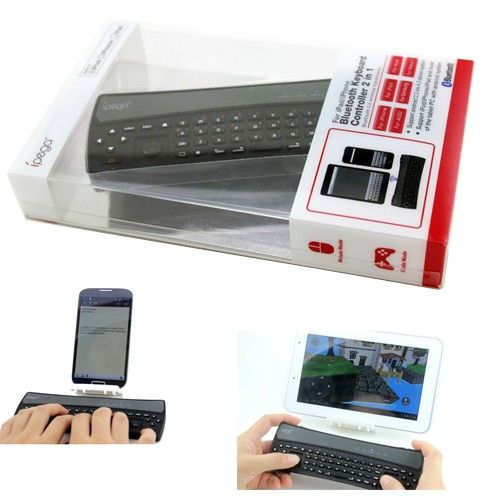
基本信息。
连接类型:蓝牙
无线:无线
应用:笔记本电脑,平板电脑,移动电话
接口:蓝牙
形状:修身
产品定位:游戏键盘
关键数字:56
文本输入:多债券
颜色:黑色
包装:吸塑包装
特点:2合蓝牙键盘和控制器
出口市场:北美,南美,东欧,非洲,西欧
附加信息。
包装:泡罩包装的每一个
产地:中国广州
生产能力:10000PCS每月
产品描述
在1蓝牙键盘控制器2为iPad / iPhone
介绍
该产品是专为iPad和其他品牌的电脑,如三星,宏碁,AUSU,Nexus7,Kindle Fire的高清等,其中有蓝牙键盘和游戏控制器的功能。
1.不需要加载任何驱动,只需用手机蓝牙配对;
2.内置锂电池,可以使用很长一段时间后的收费,安全性和稳定性。
3.蓝牙3.0无线传输,运行在6-8米的距离
4,人性化的软件设计,选择节能模式下断开。
5.支持Android 2.3,IOS 4.3以上系统;
6.支持的iPod / iPhone / iPad和大多数平板电脑采用Android系统的;
附件:
微型USB充电线* 1
支持游戏介绍:
为了支持广大模拟器下Android系统的赛车和塔防游戏(如FC模拟器,GBA模拟器,街机模拟器,SFC模拟器,N64模拟器,Shadowgun,索尼克CD,科迪,soulcraft,Zenonia4,9局2013年,激流GP ,愤怒的小鸟,水果忍者,安全气囊弗兰克3D,植物大战僵尸,Gunsn荣耀,等)
为了支持下,ISO体系广大游戏虚拟键盘(如枪手克莱夫,氦男孩,邪恶联盟,危机2的联赛,神庙逃亡,等等)
使用手册 ()
1.控制器特点:
A.手柄模式:该模式支持最Android的游戏,比如FC模拟器,GBA模拟器,街机游戏模拟器,SFC模拟器,N64模拟器,Shadowgun,索尼克CD,科迪,Zenonia4,9局2013年,Soulcraft的
编码步骤:
1.首先press'Gamepad'key,然后press'HOME'key直到手柄LED指示灯呈蓝色光;
2. Setbluetoothscanclick设备名称(如图A1 / 2/3),在配对时不需要密码,如果LED变为蓝色亮,则表示该指标对连接成功。
B. ICADE模式:该模式只支持iOS系统,大部分的IOS游戏,如氦气男孩危机2,神庙逃亡联盟
编码步骤:(请更改输入法的英文匹配之前)
1.首先按“ICADE”柯Y,然后按“HOME”键,直到ICADE LED变为蓝灯快速闪过;
2. Setgeneralbluetoothclick设备名称(如图乙
1/2/3),配对时,当LED指示灯变成蓝色亮点无需输入密码,指示灯配对成功连接。 点击设备名称(如图B1 / 2/3),配对时,当LED转向BLUT光线明亮的,这意味着指标配对成功连接不需要密码。
C.鼠标模式:这种模式支持全触摸和塔防游戏
如愤怒的小鸟,水果忍者,安全气囊弗兰克3D,植物大战僵尸,Gunsn荣耀
编码步骤:
1.首先press'GamePad'key,然后press'HOME'key,直到蓝牙指示灯变成BLUT闪光;
2. Setbluetoothscanclick设备名称(如图A1 / 2/3),不配对时,当LED转向BLUT光线明亮的,这意味着指标成功连接需要密码。
介绍
该产品是专为iPad和其他品牌的电脑,如三星,宏碁,AUSU,Nexus7,Kindle Fire的高清等,其中有蓝牙键盘和游戏控制器的功能。
1.不需要加载任何驱动,只需用手机蓝牙配对;
2.内置锂电池,可以使用很长一段时间后的收费,安全性和稳定性。
3.蓝牙3.0无线传输,运行在6-8米的距离
4,人性化的软件设计,选择节能模式下断开。
5.支持Android 2.3,IOS 4.3以上系统;
6.支持的iPod / iPhone / iPad和大多数平板电脑采用Android系统的;
附件:
微型USB充电线* 1
支持游戏介绍:
为了支持广大模拟器下Android系统的赛车和塔防游戏(如FC模拟器,GBA模拟器,街机模拟器,SFC模拟器,N64模拟器,Shadowgun,索尼克CD,科迪,soulcraft,Zenonia4,9局2013年,激流GP ,愤怒的小鸟,水果忍者,安全气囊弗兰克3D,植物大战僵尸,Gunsn荣耀,等)
为了支持下,ISO体系广大游戏虚拟键盘(如枪手克莱夫,氦男孩,邪恶联盟,危机2的联赛,神庙逃亡,等等)
使用手册 ()
1.控制器特点:
A.手柄模式:该模式支持最Android的游戏,比如FC模拟器,GBA模拟器,街机游戏模拟器,SFC模拟器,N64模拟器,Shadowgun,索尼克CD,科迪,Zenonia4,9局2013年,Soulcraft的
编码步骤:
1.首先press'Gamepad'key,然后press'HOME'key直到手柄LED指示灯呈蓝色光;
2. Setbluetoothscanclick设备名称(如图A1 / 2/3),在配对时不需要密码,如果LED变为蓝色亮,则表示该指标对连接成功。
B. ICADE模式:该模式只支持iOS系统,大部分的IOS游戏,如氦气男孩危机2,神庙逃亡联盟
编码步骤:(请更改输入法的英文匹配之前)
1.首先按“ICADE”柯Y,然后按“HOME”键,直到ICADE LED变为蓝灯快速闪过;
2. Setgeneralbluetoothclick设备名称(如图乙
1/2/3),配对时,当LED指示灯变成蓝色亮点无需输入密码,指示灯配对成功连接。 点击设备名称(如图B1 / 2/3),配对时,当LED转向BLUT光线明亮的,这意味着指标配对成功连接不需要密码。
C.鼠标模式:这种模式支持全触摸和塔防游戏
如愤怒的小鸟,水果忍者,安全气囊弗兰克3D,植物大战僵尸,Gunsn荣耀
编码步骤:
1.首先press'GamePad'key,然后press'HOME'key,直到蓝牙指示灯变成BLUT闪光;
2. Setbluetoothscanclick设备名称(如图A1 / 2/3),不配对时,当LED转向BLUT光线明亮的,这意味着指标成功连接需要密码。
Basic Info.
Connection Type: Bluetooth
Wireless: Wireless
Application: Laptop, Tablet PC, Mobile Phones
Interface: Bluetooth
Shape: Slim
Product Positioning: Game Keyboard
Key Numbers: 56
Text Input: Multi Bond
Color: Black
Package: Blister Package
Feature: 2 In1 Bluetooth Keyboard and Controller
Export Markets: North America, South America, Eastern Europe, Africa, Western Europe
Additional Info.
Packing: Each One in a Blister Package
Origin: Guangzhou, China
Production Capacity: 10000PCS Per Month
Product Description
Bluetooth keyboard controller 2 in 1 for iPad/ iPhone
Introduction
This product is specially designed for iPad and other brand PC, Such as Samsung, Acer, AUSU, Nexus7, Kindle fire HD etc, which has bluetooth keyboard and game controller function.
1. Don't need to load any drive, just pairing with phone bluetooth;
2. Built-in lithium battery which can use for a long time after charged, safety and stability.
3. Bluetooth 3.0 wireless transmission, operation distance in 6-8 meters
4. Humanized software design, choose energy saving mode disconnected.
5. Support android 2.3, ios 4.3 above system;
6. Support iPod/ iPhone/ iPad and most of the tablet PC with android system;
Accessories:
Micro USB charging cable* 1
Support Game description:
To support the majority of simulators with racing and tower defense games under Android system (Such as FC simulators, GBA simulator, Arcade simulator, SFC simulator, N64 simulator, Shadowgun, Sonic CD, Cordy, soulcraft, Zenonia4, 9 Innings 2013, Riptide GP, Angry Birds, Fruit Ninja, Airbag Frank 3D, Plants vs. Zombies, Gunsn Glory, etc)
To support the majority of games with virtual keyboard under ISO system (Such as Gunman Clive, Helium Boy, League of Evil, League of Evil 2, Temple Run, etc)
User Manual ()
1. Controller Feature:
A. Gamepad mode: This mode support s most of the Android games, such as FC simulator, GBA simulator, Arcade game simulator, SFC simulator, N64 simulator, Shadowgun, Sonic CD, Cordy, Zenonia4, 9 Innings 2013, Soulcraft
Coding steps:
1. First press'Gamepad'key, then press'HOME'key until Gamepad LED turns to blue light;
2. Setbluetoothscanclick equipment name ( as shown fig A1/2/3) , no password is needed when pairing, if LED turns to blue bright, it means the indicator pair connection is successful.
B. ICade mode: This mode just supports ios system and most of the ios games, such as Helium Boy, League of Evil 2, Temple Run
Coding steps: (Please change input method into English before matching )
1. First press the 'iCade' ke y, then press 'HOME' key, until the iCade LED turns to blue light quick flash;
2. Setgeneralbluetoothclick equipment name ( as shown fig B
1/2/3) , needn't input password when pairing, when LED turns to blue bright, indicator pairing connect successfully. Click equipment name ( as shown fig B1/2/3) , don't need password when pairing, when LED turns to blut light bright which means indicator pairing connect successfully.
C. Mouse model: This model supports all touch and tower defense game
, such as Angry Birds, Fruit Ninja, Airbag Frank 3D, Plants vs. Zombies, Gunsn Glory
Coding steps:
1. First press'GamePad'key, then press'HOME'key, until bluetooth LED turns to blut light flash;
2. Setbluetoothscanclick equipment name (as shown fig A1/2/3) , don't need password when pairing, when LED turns to blut light bright which means indicator connect successfully.
Introduction
This product is specially designed for iPad and other brand PC, Such as Samsung, Acer, AUSU, Nexus7, Kindle fire HD etc, which has bluetooth keyboard and game controller function.
1. Don't need to load any drive, just pairing with phone bluetooth;
2. Built-in lithium battery which can use for a long time after charged, safety and stability.
3. Bluetooth 3.0 wireless transmission, operation distance in 6-8 meters
4. Humanized software design, choose energy saving mode disconnected.
5. Support android 2.3, ios 4.3 above system;
6. Support iPod/ iPhone/ iPad and most of the tablet PC with android system;
Accessories:
Micro USB charging cable* 1
Support Game description:
To support the majority of simulators with racing and tower defense games under Android system (Such as FC simulators, GBA simulator, Arcade simulator, SFC simulator, N64 simulator, Shadowgun, Sonic CD, Cordy, soulcraft, Zenonia4, 9 Innings 2013, Riptide GP, Angry Birds, Fruit Ninja, Airbag Frank 3D, Plants vs. Zombies, Gunsn Glory, etc)
To support the majority of games with virtual keyboard under ISO system (Such as Gunman Clive, Helium Boy, League of Evil, League of Evil 2, Temple Run, etc)
User Manual ()
1. Controller Feature:
A. Gamepad mode: This mode support s most of the Android games, such as FC simulator, GBA simulator, Arcade game simulator, SFC simulator, N64 simulator, Shadowgun, Sonic CD, Cordy, Zenonia4, 9 Innings 2013, Soulcraft
Coding steps:
1. First press'Gamepad'key, then press'HOME'key until Gamepad LED turns to blue light;
2. Setbluetoothscanclick equipment name ( as shown fig A1/2/3) , no password is needed when pairing, if LED turns to blue bright, it means the indicator pair connection is successful.
B. ICade mode: This mode just supports ios system and most of the ios games, such as Helium Boy, League of Evil 2, Temple Run
Coding steps: (Please change input method into English before matching )
1. First press the 'iCade' ke y, then press 'HOME' key, until the iCade LED turns to blue light quick flash;
2. Setgeneralbluetoothclick equipment name ( as shown fig B
1/2/3) , needn't input password when pairing, when LED turns to blue bright, indicator pairing connect successfully. Click equipment name ( as shown fig B1/2/3) , don't need password when pairing, when LED turns to blut light bright which means indicator pairing connect successfully.
C. Mouse model: This model supports all touch and tower defense game
, such as Angry Birds, Fruit Ninja, Airbag Frank 3D, Plants vs. Zombies, Gunsn Glory
Coding steps:
1. First press'GamePad'key, then press'HOME'key, until bluetooth LED turns to blut light flash;
2. Setbluetoothscanclick equipment name (as shown fig A1/2/3) , don't need password when pairing, when LED turns to blut light bright which means indicator connect successfully.

&img=www.atupapa.com/show/wxbuyer/img/apk.png&url=//www.atupapa.com/show/wxbuyer/whatnear.apk)