for MISC Samsung HDTV Adaptor for Samsung S4
对于MISC三星HDTV适配器三星S4
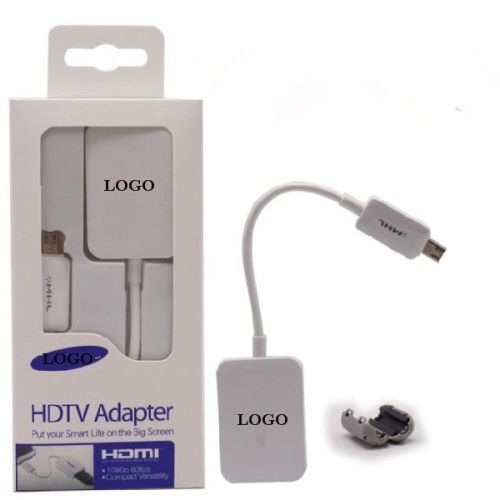
基本信息。
产品型号:HDTV转接头三星S4
接口:USB
开关:不带开关
伸缩:伸缩
充电功能:没有充电功能
长度:19.2厘米
性别:男,女
屏蔽:非屏蔽
连接器类型:HDTV
应用:智能手机
主要市场:全球
附加信息。
商标:OEM
包装:零售包装
原产地:中国制造
生产能力:5000 /周
产品描述
HDTV适配器用于三星Galaxy S4
-MHL 2.0技术,外部电源不需要
-Shows您的1080P高清视频大
ET-H10FAUWEGWW MHL高清电视的HDMI适配器银河S4 I9500 / I9300 S3 /注2 N7100
镜像通过标准HDMI输出的S4兼容电视上
有了这个MHL高清适配器可以播放通过您的Galaxy S4的视频内容到您的高清晰度电视。 它也可以让你反映什么是显示你的S4的屏幕上,这样你就可以直接从您的手机享受您最喜爱的媒体内容到您的HDTV。
简单易用
简单直观,银河S4 MHL高清适配器是很容易设置和连接到您的Galaxy S4。 只需通过微型USB适配器连接到您的智能手机,并使用常用的HDMI电缆将适配器连接到您的HDTV。 最后,为了确保该连接可以建立,该适配器需要使用Micro USB充电器供电。
反向兼容性支持与Galaxy S3和Galaxy Note的2使用
这个MHL适配器的设计保证了它是既银河S3和注2使用兼容(MHL仅1.0支持)。
非官方配件
这是最高的产品质量和安全标准作出了非官方的产品。 此外,该产品是用前面提到的智能手机型号兼容。
请按照以下步骤进行连接:
HDMI线缆的一端连接到MHL适配器。
2.将另一端连接到HDMI端口,您的电视上。 确保您的电视在HDMI模式下(不包括HDMI线)
3.你原来的充电器连接到MHL适配器。 (不需要S4,但需要的S3和Note 2)
电视屏幕上会显示你有什么设备主屏幕上。
包装组件:
全新的零售包装
1X MHL适配器
1X多国语言说明书
-MHL 2.0技术,外部电源不需要
-Shows您的1080P高清视频大
ET-H10FAUWEGWW MHL高清电视的HDMI适配器银河S4 I9500 / I9300 S3 /注2 N7100
镜像通过标准HDMI输出的S4兼容电视上
有了这个MHL高清适配器可以播放通过您的Galaxy S4的视频内容到您的高清晰度电视。 它也可以让你反映什么是显示你的S4的屏幕上,这样你就可以直接从您的手机享受您最喜爱的媒体内容到您的HDTV。
简单易用
简单直观,银河S4 MHL高清适配器是很容易设置和连接到您的Galaxy S4。 只需通过微型USB适配器连接到您的智能手机,并使用常用的HDMI电缆将适配器连接到您的HDTV。 最后,为了确保该连接可以建立,该适配器需要使用Micro USB充电器供电。
反向兼容性支持与Galaxy S3和Galaxy Note的2使用
这个MHL适配器的设计保证了它是既银河S3和注2使用兼容(MHL仅1.0支持)。
非官方配件
这是最高的产品质量和安全标准作出了非官方的产品。 此外,该产品是用前面提到的智能手机型号兼容。
请按照以下步骤进行连接:
HDMI线缆的一端连接到MHL适配器。
2.将另一端连接到HDMI端口,您的电视上。 确保您的电视在HDMI模式下(不包括HDMI线)
3.你原来的充电器连接到MHL适配器。 (不需要S4,但需要的S3和Note 2)
电视屏幕上会显示你有什么设备主屏幕上。
包装组件:
全新的零售包装
1X MHL适配器
1X多国语言说明书
Basic Info.
Model NO.: HDTV ADAPTOR FOR SAMSUNG S4
Connector: USB
Switch: Without Switch
Retractable: Retractable
Charging Function: Without Charging Function
Lenght: 19.2cm
Gender: Male-Female
Shielding: Non-Shielded
Connector Type: HDTV
Application: Smart Phone
Export Markets: Global
Additional Info.
Trademark: OEM
Packing: Retail Packaging
Origin: Made in China
Production Capacity: 5000/ Week
Product Description
HDTV adapter For Samsung Galaxy S4
-MHL 2.0 technology, external power source not required
-Shows your 1080P HD video on big
ET-H10FAUWEGWW MHL HDTV HDMI Adapter for Galaxy S4 I9500 / S3 I9300 / Note 2 N7100
Mirror your S4 through the standard HDMI output on a compatible TV
With this MHL HDTV adaptor you can playback video content through your Galaxy S4 onto your High Definition TV. It also allows you to mirror what is shown on your S4's screen so you can enjoy your favourite media content directly from your phone to your HDTV.
Simple and easy to use
Simple and intuitive, the Galaxy S4 MHL HDTV Adapter is easy to set up and connect to your Galaxy S4. Simply connect the adapter to your smartphone via the Micro USB and use a regular HDMI cable to connect the adapter to your HDTV. Finally, to ensure that the connection can be established, the adapter needs to be powered using a Micro USB charger.
Reverse compatability supports use with the Galaxy S3 and Galaxy Note 2
The design of this MHL adapter ensures that it is compatible for use with both the Galaxy S3 and Note 2 (MHL 1.0 support only) .
UNOfficial accessory
This is an unofficial product made to the highest product quality and safety standards. Additionally, the product is compatible with the previously mentioned smartphone models.
Follow the steps below to connect:
1. Connect one end of HDMI cable into the MHL adapter.
2. Connect the other end to the HDMI port on your TV. Make sure your TV is in HDMI mode (HDMI cable not included)
3. Connect your ORIGINAL travel charger to the MHL adapter. (not required for S4 but required for S3 and Note 2)
The TV screen will display what is on your device home screen.
Package Components:
Brand new in retail package
1X MHL adapter
1X multiple languages manual
-MHL 2.0 technology, external power source not required
-Shows your 1080P HD video on big
ET-H10FAUWEGWW MHL HDTV HDMI Adapter for Galaxy S4 I9500 / S3 I9300 / Note 2 N7100
Mirror your S4 through the standard HDMI output on a compatible TV
With this MHL HDTV adaptor you can playback video content through your Galaxy S4 onto your High Definition TV. It also allows you to mirror what is shown on your S4's screen so you can enjoy your favourite media content directly from your phone to your HDTV.
Simple and easy to use
Simple and intuitive, the Galaxy S4 MHL HDTV Adapter is easy to set up and connect to your Galaxy S4. Simply connect the adapter to your smartphone via the Micro USB and use a regular HDMI cable to connect the adapter to your HDTV. Finally, to ensure that the connection can be established, the adapter needs to be powered using a Micro USB charger.
Reverse compatability supports use with the Galaxy S3 and Galaxy Note 2
The design of this MHL adapter ensures that it is compatible for use with both the Galaxy S3 and Note 2 (MHL 1.0 support only) .
UNOfficial accessory
This is an unofficial product made to the highest product quality and safety standards. Additionally, the product is compatible with the previously mentioned smartphone models.
Follow the steps below to connect:
1. Connect one end of HDMI cable into the MHL adapter.
2. Connect the other end to the HDMI port on your TV. Make sure your TV is in HDMI mode (HDMI cable not included)
3. Connect your ORIGINAL travel charger to the MHL adapter. (not required for S4 but required for S3 and Note 2)
The TV screen will display what is on your device home screen.
Package Components:
Brand new in retail package
1X MHL adapter
1X multiple languages manual

&img=www.atupapa.com/show/wxbuyer/img/apk.png&url=//www.atupapa.com/show/wxbuyer/whatnear.apk)