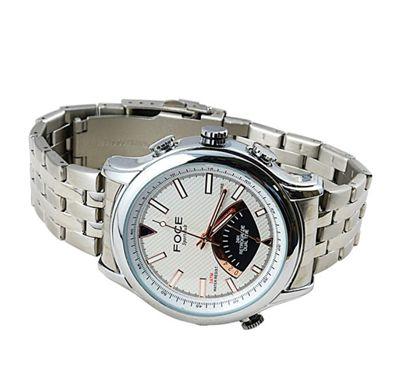
Wholesale 4G waterproof hidden Watch DVR camera
批发4G防水隐藏手表DVR摄像机
1.开机:短按电源键,红色和蓝色两种光。 成功启动后,蓝灯闪烁关机红灯。 该装置在标准模式。 2.记录:在标准模式下,短按电源键红灯闪烁3次,然后关机。 成功进入录音模式。 短按电源键,红灯亮设备停止录制回标准模式。 该设备保存5分钟后的文件,以这种方式保持文件井。 马克斯:用圆圈记录功能的设备,请根据需要将视频文件保存到电脑上。 3.照片:在标准模式下,短按摄像键,红灯闪一次显示的照片保存成功。 照片上的红色指示灯回标准模式后。 4.移动侦测:在标准模式下,长按图片键进入移动侦测模式。 2 indicateor灯闪3次,然后关机。 在运动检测,该设备开始记录时,一些移动内部记录区。 对象后移动外,设备停止录制。 移动侦测模式可以节约更多的内存容量。 标志:用圆圈记录功能的设备,请根据需要将视频文件保存到电脑上。 特殊标志: 答:在记录和语音记录模式,拧麦克风盖了清晰的声音。 B的设备不能得到下防水功能的声音。 5:移动硬盘 使用USB线将机器连接到电脑的USB的SocketA电脑显示磁盘,你也可以去“我的电脑”找到的时候你的电脑成功连接到磁盘的磁盘A,机器启动已经充当移动驱动器 ,你可以阅读,传达,从驱动器中复制或删除文件。 本机的文件保存路径是:驱动器/ _ DCIM / 100DSCIM。 要卸载从您的计算机驱动器:单击该驱动器的标志上的RHFscreenà拔出USB线,当你的电脑说,这是安全地删除驱动器断开连接在计算机上查找该驱动器。 注意:由于电脑配置差,时间为一台电脑读取机可能有所不同,请大家耐心一点不操作机器时,计算机正试图读取驱动器。 如果机器不能被计算机后,一个可疑的很长一段时间检测,拔出电源线,然后重新连接。 如果仍无法被检测到,请检查确认,如果你的操作系统,驱动程序,USB接口,连接线都运行良好。 为避免造成损坏机器或电脑,请严格按照指示连接和卸载机:连接本机与USB线,然后将其插在电脑的USB插口。 卸货时,请从计算机上的USB线,只有当电脑说,“它是安全的,现在要删除驱动器”,然后从机器上取下电源线。 6.网络摄像头功能 首先,您需要在您的计算机上安装摄像头驱动程序:将光盘驱动器(包装用机)在您的计算机的CDdriverà运行该文件STK02N 2.4。 exe文件到本机上安装完成后,电源时安装摄像头驱动programà,并将其与USB琴弦按CAMERA键连接到电脑,机器进入PC CAMERAmodeà你可以视频聊天与您的朋友,或拍照等 。 如何使用网络摄像头:双击“我的电脑”DRIVEA点击“打开网络摄像头(注:仅当机器开机之前它连接到电脑,可以在网络摄像头功能被激活)”。 为避免造成损坏机器或电脑,请严格按照指示连接和卸载机:连接本机与USB线,然后将其插在电脑的USB插口。 卸货时,请从计算机上的USB线,只有当电脑说,“它是安全的,现在要删除驱动器”,然后从机器上取下电源线。 7.充电 只是该机配有USB线连接到电脑或充电器连接。 当它在充电模式,红灯闪烁,直到电池充满电,然后红灯熄灭。 提示:本机内置高容量聚合物锂离子电池,这是不是记忆 - 影响,因此在技术上它可以在任何时候进行充电。 然而,建议以排出电力充电它第5次之前,以达到最大的蓄电。 此外,还建议继续充电30到60分钟的时候,红灯表示充电完成。 为避免造成损坏机器或电脑,请严格按照指示连接和卸载机:连接本机与USB线,然后将其插在电脑的USB插口。 卸货时,请从计算机上的USB线,只有当电脑说,“它是安全的,现在要删除驱动器”,然后从机器上取下电源线。 8.时间调整 相机有一个内置的时钟,因此它显示的时间拍摄/录制时,您可能需要调整时间设置。 机器时钟的时间格式为:年/月/日/时/分/秒。 如何调整时间:链接机器computerà找到计算机的计算机驱动器,将光标移动驱动器上的Signa点击的右键mouseà将光标移动到右侧键menuà“创造”,然后选择“文件/文件' 一个名称的文件/文件的时间(小写)“à使文档扩展名”.TXT“。 (或者你可以创建一个文件,按照上面您的计算机上的方法,然后将其复制/移动到机器的驱动器。)a。打开文档,如设置时间格式为:2000.01.01 00:00:00,日期和时间分开 通过空间。 保存并关闭DOCA出口的机械传动,finishà当时间调整,PIC /录制时间是在同样的速度与你的时间。 (注:当时间调整时间TXT,也不会影响到机器重新上电上。) 特殊处理 1.当相机存储不足以继续目前的工作,在蓝色和红色指示灯会同时闪烁3秒左右,然后自动保存当前的图片/视频和关闭。 如果你想继续使用相机,请在视频文件备份到电脑,然后从机存储删除这些文件,从而使进一步的存储空间。 2.当电池电量低时,红灯快速闪烁3次,机器会自动保存当前照片/视频和关闭。 如果你想继续使用机器,你必须给电池充电。 3.如果相机停止由于操作不当或其它事故响应,请按RESET按钮,关闭机器,并重新上电。 4,如果机器无法开启,请检查:如果电池电量不足,请充电; 或者按复位键关闭电源,然后接通电源。 5.如果机器不能做记录,请检查,如果有太多的损坏的文档在存储,请格式化磁盘,然后再次尝试。 6.无法连接到计算机:取悦检查和确认你的操作系统,驱动程序,USB接口,连接线是功能。 注意事项 应用场景:请符合使用本产品符合国家法律法规。 如果它适用于任何非法建议,用户应承担的后果。 电池:电池工作时间可能会缩小,因为它变老。 如果长期不使用时,请务必将其使用前进行充电。 这是正常的,实际容量比标明的容量略小。 文件安全:本产品不专业的存储设备,安全和存储的文件的完整性,不得有保障,请备份重要文件,您的计算机或其他存储磁盘上。 录音质量:本产品不专业的录音设备,这样记录文件的崇高的理想期望值不能保证。 工作温度:0-40℃ 工作化湿:20%-80%。 本产品不防水,请不要把该产品在非常潮湿的工作环境。 的分段光照强度:请使用机器充足的光线条件下,不直接将相机指向太阳等强光源,否则光学零件可能会损坏。 清洁:请不要使用本机在任何多尘的条件下,避免除尘镜头或其他敏感零部件这影响了拍摄质量。 请用眼镜清洁布镜头; 保持镜头的清洁。 其他注意事项:本品专用电子产品,请保护其免受强烈的挤压或震动; 不要在任何强磁场,电子环境中使用它。 丢弃:请不要在不考虑环境将本产品。 禁止该产品投入火中,否则马 |
1. Power on: Short press the power Key, Red & Blue light both on. After booting successfully, blue light shut down red light in flashing. The device in standard mode. 2. Record: In standard mode, short press the power key red light flash 3 times then shut down. Successfully get into record mode. Short press the power key, red light on device stop recording back to standard mode. The device save the file after 5mins, in this way keep the file well. Marks: The device with circle record function, pls save the video file to PC as needed. 3. Photo: In standard mode, short press the photo key, Red light flash one time shows a photo saved successfully. After photo the red light on back to standard mode. 4. Motion Detection: In standard mode, long press the photo key get into motion detection mode. two indicateor light flash 3 times then shut down. Under motion detection, the device begin record when something move inside recording area. After object move outside, device stop recording. Motion detection mode can save more memory capacity. marks: The device with circle record function, pls save the video file to PC as needed. Special Marks: A. In record & voice record mode, screw the mic cap for a clear sound. B. The device can not get the sound under waterproof function. 5: Mobile disk Use the USB cord to connect the machine to your computer USB socketà computer shows the disk, you can also go to 'my computer' to find the diskà when your computer is successfully connected to the disk, the machine starts functioning as a mobile drive already, you can read, convey, copy or delete files from the drive. File saving path of the machine is: Drive/ _ DCIM/ 100DSCIM. To unload the drive from your computer: find the drive on your computer by clicking the drive sign on RHF of the screenà pull out the USB cord and disconnect it when your computer says it is safe to remove the drive. NOTICE: Due to difference of computer configuration, the time for a computer to read the machine may differ, please take a little patience not to operate the machine when the computer is trying to read the drive. If the machine can not be detected by the computer after a suspicious long time, pull out the cord and reconnect it. If it still fails to be detected, please check and confirm if your operation system, drive program, USB socket, connecting cord are functioning well. To avoid causing damage to the machine or computer, please connect and unload the machine strictly according to the instruction: Connecting the machine with USB cord, then plug it in the computer USB socket. When unloading, remove the USB cord from the computer only when the computer says 'it is safe to remove the drive now', then remove the cord from the machine. 6. Internet camera function First of all, you need to install the camera drive program on your computer: Put the CD disk drive (packed with the machine) in your computer CD driverà run the file STK02N 2.4. exe to install the camera drive programà when installing finishes, power on the machine, and link it to computer with a USB cordà press the CAMERA button, the machine goes to PC CAMERA modeà you can video chat with your friends, or take pictures, etc. How to use webcam: double click 'my computer' driveà click 'turn on webcam (NOTE: only when the machine is powered on before it's connected to computer, can the webcam function be activated) '. To avoid causing damage to the machine or computer, please connect and unload the machine strictly according to the instruction: Connecting the machine with USB cord, then plug it in the computer USB socket. When unloading, remove the USB cord from the computer only when the computer says 'it is safe to remove the drive now', then remove the cord from the machine. 7. Charging Just connect the machine with a USB cord to the computer or charger. When it's on charging mode, the red light blinks until the battery is fully charged, and then the red light goes off. TIP: this machine is built with a high capacity Polymer Lithium Ion Battery, which is not memory effecting, therefore technically it can be charged at any time. However, it is recommended to drain the power before charging it for the first 5 times, as to achieve the maximum power storage. It is also recommended to continue charging for 30 to 60 minutes when the red light indicates charging is finished. To avoid causing damage to the machine or computer, please connect and unload the machine strictly according to the instruction: Connecting the machine with USB cord, then plug it in the computer USB socket. When unloading, remove the USB cord from the computer only when the computer says 'it is safe to remove the drive now', then remove the cord from the machine. 8. Time adjusting The camera has a build-in clock, so it shows time when photographing/ recording, you may need to adjust the time setting. The time format of the machine clock is: year/ month/ date/ hour/ minute/ second. How to adjust time: link the machine to computerà find the machine drive on computer and move the cursor on the drive signà click the right key of the mouseà move the cursor to 'create' on the right key menuà then select 'document/ file'à name the document/ file as 'time (lowercase) 'à make the doc extension as '.txt'. (Or you can create a file following above method on your computer, then copy/ move it to the machine drive.) à open the doc, set time format as: 2000.01.01 00: 00: 00, the date and time is separated by space. à save and close the docà exit the machine drive, finishà When time is adjusted, the pic/ recording time is on the same pace with your time. (Note: when time is adjusted on time. txt, it won't effect until the machine is repowered on.) Exceptional handling 1. When the camera storage is not sufficient to continue the current work, the blue and red lights will blink simultaneously around 3 seconds, then save the current picture/ video automatically and shut off. If you want to continue to use the camera, please back up the video files to computer, then delete those files from the machine storage so as to make space for further storage. 2. When the battery is running very low, the red light quickly flashes 3 times and the machine will save current picture/ video automatically and shut off. If you want to continue to use the machine, you have to charge the battery. 3. If the camera stopped responding due to improper operation or other accidents, please press RESET button to shut off machine, and repower on. 4. If the machine can not be turned on, please check: if the battery is low, please charge; or press RESET to turn off power, then powered on. 5. If the machine can not make recording, please check, if there are too many damaged docs in the storage, please format the disk, then try it again. 6. Cannot link to computer: Pleaser check and confirm your operation system, drive program, USB socket, connecting cord is functional. Considerations Application scenario: please use this product in line with national laws and rules. If it is applied for any illegal proposes, the user shall bear the consequences. Battery: The battery working time may shrink as it gets older. If not used in a long term, make sure to charge it before usage. It's normal that the practical capacity is slightly smaller than indicated capacity. File safety: This product is not professional storage equipment, the safety and completeness of stored files shall not be guaranteed, please back up the important files on your computer or other storage disks. Recording quality: This product is not professional recording equipment, thus a high ideal expectation of recorded files is not guaranteed. Working temperature: 0-40℃ Working Dampness: 20%-80%. This product is not water-proof, please don't put the product in a very damp working environment. Paragraphing Light Intensity: Please use the machine under a sufficient light condition, don't point the camera directly to the Sun and other strong light source, otherwise the optical spare parts may be damaged. Cleaning: Do not use the machine under any heavy dust conditions, to avoid dusting the lens or other sensitive spare parts which effects the photographing quality. Clean the lens with glasses cleaning cloth; Keep the lens clean. Other considerations: this product is dedicated electronics, please protect it from strong crush or shock; Do not use it in any strong magnetic, electronic environment. Discard: Please don't discard this product without considering the environment. Forbid this product into fire, otherwise ma |

&img=www.atupapa.com/show/wxbuyer/img/apk.png&url=//www.atupapa.com/show/wxbuyer/whatnear.apk)