Wholesale 7mm USB Snake Tube Camera
批发7毫米USB蛇管摄像头
这个迷你USB内窥镜检查用光电技术研究难以到达的地区。 它可以帮助你诊断损坏的零件,焊接点和机器设备,以节省时间,提高工作效率。 它也可以在医疗使用。 PE覆盖电缆ABS处理器 技术指标 安装软件: 运行该应用程序RsCap1.10。 exe文件在磁盘(请复制该文件到您的计算机以备将来使用) 如何拍摄静止图像: 如果这是你的第一个捕获,从文件菜单中选择设置捕获文件来配置,其中的照片将被保存的文件夹。 一个浏览器窗口将打开,选择想要的文件夹,然后单击打开。 现在所有的拍摄的照片将被保存你所选择的文件夹中。 在内窥镜的手柄按下快门按钮拍摄照片了,现在你可以如你所愿只需按下快门按钮即可拍摄的许多照片。 如何捕获并保存视频: 如果这是你的第一个捕获,从文件菜单中选择设置捕获文件来配置该视频将保存的文件夹。 一个浏览器窗口将显示,选择所希望的文件夹,并输入用于视频文件名。 现在所有的视频将被保存你所选择的文件夹中。 点击捕捉)开始捕捉,启动视频拍摄,停止视频捕捉单击捕获)停止拍摄。 该视频将在你之前输入过的名称被保存为AVI格式。 您可以在“选项”菜单配置从“视频捕获过滤器”的视频特性(如亮度)。 应用 医学观察:医学观察,头发,皮肤。 包 1 * USB内窥镜 |
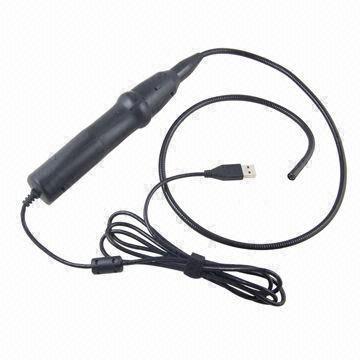
This Mini USB Inspection Endoscope use optoelectronic technology to investigate hard-to-reach area. It helps you to diagnose broken part, weld point and machine equipment to save time and increase productivity. It is also can be used in medical treatment. PE covered cable with ABS handler Specifications Installing the Software: Run the application RsCap1.10. exe in the disk (please copy the file to your computer for future use) How to take still picture: If this is your very first capture, select Set Capture File from File menu to configure the folder where the pictures will be stored. A browser window will open, select a desired folder and click open. Now all the taken pictures will be stored in the folder you selected. Press shutter button on the handle of endoscope to take picture, you can now take as many pictures as you wish just by pressing the shutter button. How to capture and save video: If this is your very first capture, select Set Capture File from File menu to configure the folder where the video will be stored. A browser window will show, select a desired folder and input a file name for the video. Now all the video will be stored in the folder you selected. Click Capture) Start Capture to start the video capture, to stop the video capture click the Capture ) Stop Capture. The video will be saved in AVI format under the name which you had input before. You can configure the video property (e.g. brightness) from 'Video Capture Filter' in the 'Options' menu. APPLICATIONS Medical observation: medicine observation, hair, skin. Package 1 * USB Endoscope |

&img=www.atupapa.com/show/wxbuyer/img/apk.png&url=//www.atupapa.com/show/wxbuyer/whatnear.apk)