Wholesale USB Digital Telephone Phone Call Voice Recorder PC
批发USB数字电话接听电话录音PC
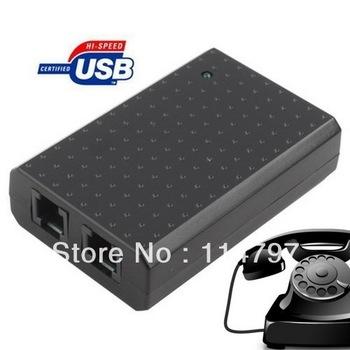
通过计算机的USB端口自动记录电话交谈成语音数据库 随着手机通话录音管理软件,可以管理所有存储的记录,甚至通过电子邮件发送它们。 自动来电号码弹出窗口提醒您立即呼叫时进入。 易于安装和使用 尺寸:约76×50×20mm的 1. USB接口,即插即用,无需驱动程序需要 2,FSK / DTMF来电显示,精度高 3.自动弹出窗口,接听和拨打电话。 记录所有传入,传出和未接电话。 4.电话本,通话记录管理和查询功能。 电话簿可以转换成Excel文件。 5.自动增益控制,使声音清晰洪亮。 6.数字录音,支持64KBPS和8KBPS,节省空间 7.电话点:高电阻连接 8.软件测量电话线电压(适用于电信和联通的任何有线模拟电话线)。 9.配备了免费录音管理软件 10.自动拨打电话簿中的号码,并通过软件从通话记录的号码 适用于台式电脑,笔记本电脑,或上网本 支持Windows 2003和Windows XP,Windows Vista中,Windows 7的 如何安装: 1.语音记录器连接到USB线计算机; 2.具有2个端口的电话线和电话; 3.安装提示时会出现刻录机通过USB连接线,第一次连接; 4.按照指示,否则请重新启动计算机。 5.录音管理软件包含在CD上。 该软件是一个自解压文件。 从CD安装软件复制到您的计算机。 6.双击USBRecorder。 exe文件是管理软件。 请双击“help_en。 在CD上的htm“了解该软件的说明。 ++包括包+ 1个电话录音 1个USB电缆 1个电话线 1个CD(包括用户指南) 包装纸箱 |
Automatically record phone conversations into a voice database through the USB port of your computer With the phone call recording management software, you can manage all of your stored recordings and even e-mail them. Automatic caller ID and popup windows alert you instantly when a call is coming in. Easy to install and use Size: about 76 x 50 x 20 mm 1. USB interface, plug and play, no driver needed 2. FSK/ DTMF Caller ID Display, high accuracy 3. Automatic popup window for incoming and outgoing calls. Record all incoming, outgoing, and missed phone calls. 4. With phonebook, call records management, and query functions. Phonebook can be converted into Excel files. 5. Automatic gain control to make sound clear and loud. 6. Digital recording, support 64KBPS and 8KBPS, save space 7. Telephone point: high resistance connection 8. With software to measure the line voltage of phone (suitable for any wired analog phone line of Telecom and Unicom) . 9. Come with free recording management software 10. Automatically dial the number in phonebook and the number from call records via the software Suitable for desktop computer, laptop, or netbook Support Windows 2003, Windows XP, Windows Vista, Windows 7 How to install: 1. Connect voice recorder to computer via USB cable; 2. With 2 ports for phone line and telephone; 3. Installation tips will appear when the recorder is connected via USB cable for the first time; 4. Please restart your computer according to the instructions. 5. Recording management software is included on the CD. The software is a self-extracting file. Copy the software from CD to your computer. 6. Double-click the USBRecorder. exe which is the management software. Please double-click 'help_en. htm' on the CD to view instructions about the software. ++ Package included ++ 1 x Phone Voice Recorder 1 x USB Cable 1 x Telephone Line 1 x CD (user guide included) Packaged in paper box |

&img=www.atupapa.com/show/wxbuyer/img/apk.png&url=//www.atupapa.com/show/wxbuyer/whatnear.apk)