Bluetooth Self-Timer Shutter for Mobilephone
蓝牙自拍快门手机
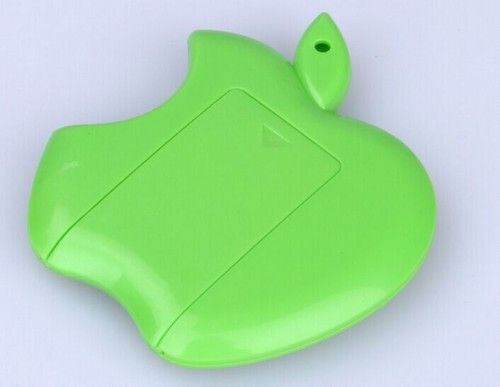
| 型号。 | OM-S904 |
| 颜色 | 彩色 |
| 兼容品牌 | 所有品牌 |
| 最大长度 | 150厘米 |
| 部分 | 独脚架 |
| 蓝牙版本 | 蓝牙Versior.3.0 |
| 有效距离 | 30英尺(10米) |
| 尺寸 | 75mm X 65mm X 5mm |
| 商标 | 没有 |
| 规范 | CE,RoHs等 |
| 证明 | CE |
| 特征 | 蓝牙 |
| 最小长度 | 15厘米 |
| 饰品 | 夹 |
| 品牌 | 无品牌 |
| 频率 | 2.4HZ〜2.4835ghz |
| 电池类型和使用寿命 | Cr2032 X 1单元格/一年 |
| 保证 | 3年 |
| 运输包装 | 吸塑包装aging |
| 起源 | 广东深圳 |
说明:
打开遥控开关,遥控蓝灯闪烁;
打开蓝牙手机,搜索新设备,然后连接;
配对后连接打开的手机摄像头软件;
苹果手机可以直接按相机快门控制;
Android手机部件还可以按相机快门控制;
6部分:无法控制相机手机下载camera360软件,然后打开camera360相机设置,音量键功能设置为采取。
如何使用-----易于设置,易于使用
1.Pairing
一个。通过打开/关闭按钮打开快门,快门将进入配对模式,指示灯同时快速启动。
湾激活手机上的蓝牙功能,并在周围购买设备
C。从列表中选择“AB快门3”的设备,并在几秒钟内自动完成配对。
2.选择APP
使用内置相机应用程序通过AB快门3拍摄照片,或者您可以从Google播放下载“相机360”的APP,如果不支持内置相机,请在以下说明中指定兼容设备和APP。
3.Shooting
选择正确的APP,然后按快门上的适当按钮进行IOS和Android手机拍摄照片。
特征:
搭建蓝牙,无需任何接收器捕获信号。
兼容性:
iPhone(4 / 4s / 5 / 5s)/ iPad mini / iPad touch iOS 4或更高版本
三星Galaxy(S2 / S3 / S4)/三星Galaxy Note(注1 / Note 2 / Note 3)/ Android 4.1或更高版本
Moto X / Nexus(4/5/7)
Sony X peria S / HTC在使用前需要下载APP〜“CAMERA 360”
4按相应的键进行手机系统配置,配置完成后LED将闪烁,然后可以正常使用。
5将自动进入睡眠模式,不使用5分钟。请按电源按钮关闭自拍,确保电池长时间使用。
6使用PC设备或手机电源适配器对产品充电,充电LED长亮,饱和LED将熄灭。
打开遥控开关,遥控蓝灯闪烁;
打开蓝牙手机,搜索新设备,然后连接;
配对后连接打开的手机摄像头软件;
苹果手机可以直接按相机快门控制;
Android手机部件还可以按相机快门控制;
6部分:无法控制相机手机下载camera360软件,然后打开camera360相机设置,音量键功能设置为采取。
如何使用-----易于设置,易于使用
1.Pairing
一个。通过打开/关闭按钮打开快门,快门将进入配对模式,指示灯同时快速启动。
湾激活手机上的蓝牙功能,并在周围购买设备
C。从列表中选择“AB快门3”的设备,并在几秒钟内自动完成配对。
2.选择APP
使用内置相机应用程序通过AB快门3拍摄照片,或者您可以从Google播放下载“相机360”的APP,如果不支持内置相机,请在以下说明中指定兼容设备和APP。
3.Shooting
选择正确的APP,然后按快门上的适当按钮进行IOS和Android手机拍摄照片。
特征:
搭建蓝牙,无需任何接收器捕获信号。
兼容性:
iPhone(4 / 4s / 5 / 5s)/ iPad mini / iPad touch iOS 4或更高版本
三星Galaxy(S2 / S3 / S4)/三星Galaxy Note(注1 / Note 2 / Note 3)/ Android 4.1或更高版本
Moto X / Nexus(4/5/7)
Sony X peria S / HTC在使用前需要下载APP〜“CAMERA 360”
4按相应的键进行手机系统配置,配置完成后LED将闪烁,然后可以正常使用。
5将自动进入睡眠模式,不使用5分钟。请按电源按钮关闭自拍,确保电池长时间使用。
6使用PC设备或手机电源适配器对产品充电,充电LED长亮,饱和LED将熄灭。
| Model NO. | OM-S904 |
| Color | Multicolor |
| Compatible Brand | All Brand |
| Maximum Length | 150cm |
| Parts | Monopod |
| Bluetooth Version | Bluetooth Versior.3.0 |
| The Effective Distance | 30FT ( 10m) |
| Size | 75mm X 65mm X 5mm |
| Trademark | No |
| Specification | CE, RoHs etc. |
| Certification | CE |
| Feature | Bluetooth |
| Minimum Length | 15cm |
| Accessories | Clip |
| Brand Name | No Brand |
| Frequency | 2.4Hz~2.4835GHz |
| Battery Type and Service Life | Cr2032 X 1 Cell/ One Year |
| Warranty | 3 Years |
| Transport Package | Blister & Packagingkagingaging |
| Origin | Shenzhen, Guangdong |
Descriptions:
Open the remote control switch, remote blue lights flashing;
Open the Bluetooth mobile phone, search for new equipment, then the connection;
After the pair and connect the open mobile phone camera software;
Apple mobile phone can directly press the camera shutter control;
The Android mobile phone parts can also press the camera shutter control;
The 6 part: unable to control camera mobile phone download the camera360 software, and then open the camera360 camera settings, the volume keys function is set to take.
How To Use-----Easy to set up ,easy to use
1.Pairing
a. Turn on the shutter by switching the on/off button, the shutter will enter into pairing mode and indicator LED starts quickly at the same time.
b. Activate the Bluetooth function on your phone and sourcing the devices around
c. Select the device of 'AB Shutter 3' from the list and paring will be finished automatically in few seconds.ew seconds.
2.Select APP
Use inbuilt camera App to taking the photos via AB Shutter 3,or you can download the APP of 'camera 360'from Google play if inbuilt camera cannot be supported, check the compatible device and APP in following instruction.instruction.
3.Shooting
Select a correct APP and press the proper button on the shutter for IOS and Android phones to taking the photos.
Feature:
Build in Bluetooth, no need for any receiver to capture signal.
Compatibility:
iPhone ( 4 / 4s / 5 / 5s ) / iPad mini / iPad touch iOS 4 or up
Samsung Galaxy ( S2 / S3 / S4 ) / Samsung Galaxy Note ( Note 1 / Note 2 / Note 3 ) / Android 4.1 or up
Moto X / Nexus ( 4 / 5 /7 )
Sony X peria S / HTC need to download APP ~ ' CAMERA 360 ' before use before use
4 Press the corresponding key for mobile phone system configuration, LED will be flashed after the configuration is completed, and then it can be used normally.
5 It will enter into the sleep mode automatically without using for 5 minutes. Please press the power button to turn off the self-timer, to ensure the battery can be used for a long time.
6 use PC device or mobile phone power adapters to charge the product, charging LED long bright, saturated LED will extinguish.
Open the remote control switch, remote blue lights flashing;
Open the Bluetooth mobile phone, search for new equipment, then the connection;
After the pair and connect the open mobile phone camera software;
Apple mobile phone can directly press the camera shutter control;
The Android mobile phone parts can also press the camera shutter control;
The 6 part: unable to control camera mobile phone download the camera360 software, and then open the camera360 camera settings, the volume keys function is set to take.
How To Use-----Easy to set up ,easy to use
1.Pairing
a. Turn on the shutter by switching the on/off button, the shutter will enter into pairing mode and indicator LED starts quickly at the same time.
b. Activate the Bluetooth function on your phone and sourcing the devices around
c. Select the device of 'AB Shutter 3' from the list and paring will be finished automatically in few seconds.ew seconds.
2.Select APP
Use inbuilt camera App to taking the photos via AB Shutter 3,or you can download the APP of 'camera 360'from Google play if inbuilt camera cannot be supported, check the compatible device and APP in following instruction.instruction.
3.Shooting
Select a correct APP and press the proper button on the shutter for IOS and Android phones to taking the photos.
Feature:
Build in Bluetooth, no need for any receiver to capture signal.
Compatibility:
iPhone ( 4 / 4s / 5 / 5s ) / iPad mini / iPad touch iOS 4 or up
Samsung Galaxy ( S2 / S3 / S4 ) / Samsung Galaxy Note ( Note 1 / Note 2 / Note 3 ) / Android 4.1 or up
Moto X / Nexus ( 4 / 5 /7 )
Sony X peria S / HTC need to download APP ~ ' CAMERA 360 ' before use before use
4 Press the corresponding key for mobile phone system configuration, LED will be flashed after the configuration is completed, and then it can be used normally.
5 It will enter into the sleep mode automatically without using for 5 minutes. Please press the power button to turn off the self-timer, to ensure the battery can be used for a long time.
6 use PC device or mobile phone power adapters to charge the product, charging LED long bright, saturated LED will extinguish.

&img=www.atupapa.com/show/wxbuyer/img/apk.png&url=//www.atupapa.com/show/wxbuyer/whatnear.apk)