- Marketplace
- Merchants
- Restaurants
- UAE house
- Cloud accounting (GCC VAT)
- Me
- Cart
- My order
- Address book
- Favorite
- Link
- About us
- Download App
- 中文
- Merchant panel
iPhone 4双Sim card accessories | Made in China
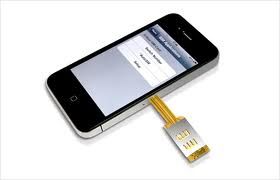
Dual Card User's Guide
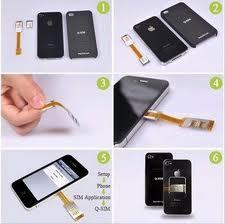
1, the installation :
SIM1 into Cato, and loaded Micro card suppress SIM1; ordinary card into the SIM2 slot; folding connection with pressed MICRO card, insert Cato cover protective shell .
2, use:
Into the phone menu, select Q-SIM, is shown below :
* Switch No. Auto / SW Setup |
To use two separate SIM card, select SIM-1 can be used alone or SIM-2, * asterisk represents choose success .
Select Auto / SW ( asterisk appears in front *), SIM-1 and SIM-2 will automatically switch .
Choose Setup will be more sub-menu selections Other functions are as follows:
SIM1 No. Sim2 No. SIM1 time: 03 Sim2 time: 03 |
Select or, you can edit the name of 11 characters SIM card, after the editing is complete, the name will replace the SIM1 or SIM2 appear on the phone screen .
Select SW Time: 03 representatives set the automatic switching time is 0-99 minutes default switching time is 3 minutes, you can set up to 99 minutes .

&img=www.atupapa.com/show/wxbuyer/img/apk.png&url=//www.atupapa.com/show/wxbuyer/whatnear.apk)