- Marketplace
- Merchants
- Restaurants
- UAE house
- Cloud accounting (GCC VAT)
- Me
- Cart
- My order
- Address book
- Favorite
- Link
- About us
- Download App
- 中文
- Merchant panel
Portable scanners | handheld scanner pen scanner
Detailed features: | ||||||
1. Image sensor: A4 Color photoelectric sensor | ||||||
2. .White balance: Auto | ||||||
3. Scan resolution: 300x300 dpi (default); High resolution: 600x600 dpi; | ||||||
4. Storage format: JPEG | ||||||
5. Scanning range: A4 (216mm) | ||||||
Maximum Scanning speed | Color High resolution | Color Low resolution | Monochrome High resolution | Monochrome Low resolution | ||
13 Seconds | 3.0 Seconds | 6.0 Seconds | 2.0 Seconds | |||
Scanning width and length | Scanning width | Scanning Length | ||||
8.27' | 300DPI: 50 (Max) | 600DPI: 25 (Max) | ||||
Capacity (Based on 1GB Micro SD; Scan A4 size file; the quantity of picture is various and depend on the content complexity) | Color High resolution | Color Low resolution | Mono High resolution | Mono Low resolution | ||
323 Photos (Min.) | 1190 Photos (Min.) | 372 Photos (Min.) | 1320 Photos (Min.) | |||
Battery life (Test method: Scan one photo → wait for 5 seconds → Scan next photo → wait for 5 seconds, so repeatedly) | 2 x AA Energizer Alkaline batteries | 2 x AA Energizer Alkaline batteries | 2000mAH AA Rechargeable batteries | |||
Scan Color | 180 Photos (Min.) | 250 Photos (Min.) | ||||
Scan Mono | 200 Photos (Min.) | 300 Photos (Min.) | ||||
8. Stored: Micro SD / TF (1GB-32GB) - (not included) | ||||||
9. Transmission mode: USB 2.0 | ||||||
10. Power supply: Alkaline battery (AA * 2, not included when shipping) | ||||||
11. Auto power off: 3minutes without operation automatically | ||||||
12. Scanning software: support windows imaging, Photo shop and other similar image processing OCR software. | ||||||
13. System environment: Windows 2000 / ME / XP, MAC, 128 MB RAM, 1000MB HDD. | ||||||
14. Fearures: Two-wheel stability control system scans the entire page | ||||||
15. Image sensor: A4 color contact image sensor | ||||||
16. Sensor number: 5136 points (1- 5104 points available) | ||||||
21. File format: jpg | ||||||
22. Dimension: 256 x 30 x 31mm | ||||||
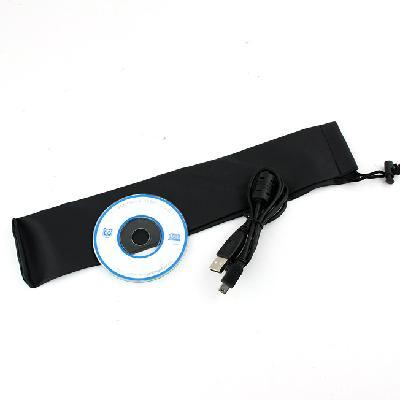
Accessories: 1 x driving disk 1 x USB Cable (link to the computer) 1 x User manual 1 x Pouch 1 x Packing box | ||||||
Scanner use
4.1 Battery Installation
1. Open the battery port
2. Insert the two AA alkaline batteries into the battery compartment
3. Press the power button for two seconds to turn the scanner
4.2 Inserting an SD card (SD card not included)
You must insert an SD card (not supplied) to record and save your scanned image
1. Turn off the scanner
2. Insert the SD card into the SD card slot, gently press into the slot to SD
Note 1. Do not force the SD card into the slot, this will damage the scanner and SD card, SD card alignment position (with the dimension line) to try again
2. SD card must be formatted before the scan, see the following operation
4.3 Format SD card
1. Insert a new SD card into the scanner, open the Scanner
2. Press the Format button to format mode, it will display 'F' icon on the screen
3. Press the power / scan button to start formatting
4. When formatting is complete, an icon on the screen will flash SD card
4.4 Setting Resolution
Press the DPI button to select the high / low resolution, high / low resolution icon will be displayed on the screen
4.5 Setting the scan mode
Press C / BW button to select color / monochrome scanning mode, color / monochrome scan icon will appear on the screen
4.6 scanning steps
A hand fixed to scan documents; place the scanner will start scanning position; clasped Scanner
Press the Scan button once; smooth and slow sliding the scanner to ensure high-quality scanned images; press again to stop scanning a scanned copy
5. LED lights
1. The green LED lights up: Scanning in progress
2. The green LED lights off: the scan is complete
3 red lights error: Scanning too fast; cause scanning errors; shall resume scanning
The red error LED is off: moderate speed, you can continue to scan
6. Connecting computer
You can put your scanner and computer to link up with the computer monitor to view your scanned image
7. Specifications
| Image Sensor | A4 color photoelectric sensor |
| Number of sensors | 5136 points (Section 1-5104 points available) |
| Resolution | Resolution 300 * 300dpi (default) |
| Scan speed | Color high-resolution 13 seconds / page black and white high-resolution 6 seconds / page |
| Storage quantity (based on 1GB of memory card, A4 paper | 600dpi color: 220 Photos (minimum), 600dpi black and white: 290 pictures (minimum); |
| Scanning Width | 8.72 |
| Scan length | 300DPI: 50 (maximum); 600DPI: 25 (maximum) |
| Storage format | JPEG |
| LCD | Scanning status display |
| Automatic shut-down | 3 minutes |
| Transmission | USB 2.0 High Speed |
| Storage | Micro SD Card |
| power supply | Batteries (5 batteries X2 |

&img=www.atupapa.com/show/wxbuyer/img/apk.png&url=//www.atupapa.com/show/wxbuyer/whatnear.apk)