- Marketplace
- Merchants
- Restaurants
- UAE house
- Cloud accounting (GCC VAT)
- Me
- Cart
- My order
- Address book
- Favorite
- Link
- About us
- Download App
- 中文
- Merchant panel
GPS Tracker, GPS positioning, GPS tracking lygpst18
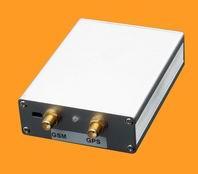
GPST18 professional car locator tracking burglar alarm remote control
Terminal Indicator:
Terminal equipment with red and blue lights in the rear to pass on the power supply, the red LED will light terminal equipment ten seconds, and then enter every two seconds flashed, indicating the device into operation. The red indicator flashes fast express terminal devices are communicating. blue lights flashed two seconds indicates that the GPS module in standby, blue light stays lit, indicates that the GPS module in the work, but not located, the blue light has been lit, indicates that the GPS module work, and has positioned.
Terminal main functions:
B, an emergency alarm is triggered: the terminal equipment installed in a vehicle when an emergency occurs, an alarm for help.
C, Remote control oil and circuit: anytime, anywhere via SMS control terminal equipment installed in a vehicle passage and circuits.
D, one-way calling features: call the terminal device's phone number, you can hear the sound around the terminal device within the range of 5 meters after turning anywhere.
It will send text messages via mobile phone text messaging notification to the device, start the movement alert function terminal equipment installed in a vehicle movement: E, the motion alarm.
F, Speed alarm: through the phones to send text messages to the device, start speeding alarm function terminal equipment installed in the vehicle speed will send SMS notification when the speed exceeds the set.
G, Electronic fence: send text messages via cell phone to the device, activate the electronic fence function terminal equipment installed in the vehicle will send text messages beyond the limited scope of notification.
H, mobile phones get through dimensions or address: You can obtain the location of installation of equipment by the vehicle through the phone's dimensions or text descriptions address (Get text address function requires platform support).
I, Remote reboot the system: send text messages via mobile phone terminal device restart.
J, set the positioning interval: You can also set the transmission interval by interval set the phone via internet data transmission platform, according to whether the platform supports this feature may be.
K, Mileage statistics, ACC detection, power failure alarm.
L, compatible with the original vehicle anti-theft device: After the car burglar alarm equipment is also alarm, notify the owner via SMS.
M, modify IP and port functions: Choose a variety of positioning platform that provides communication protocol.
1 Introduction
This product is based on GSM / GPRS network and GPS satellite positioning system, short messaging, or remote target by mutual contact locate or monitor with a mileage statistics, ACC detection, power failure alarm function, compatible with the original vehicle anti-theft devices: car alarm After the alarm equipment is also alarm, notify the owner via SMS.
2 Applications
l car rental / small fleet management.
l global satellite positioning; vehicle location query; real-time monitoring; timing tracking
l remote control off the oil off track crime
l command vehicles in various industries, scheduling system.
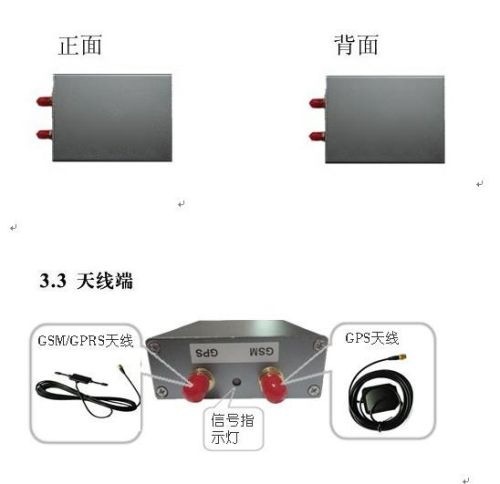
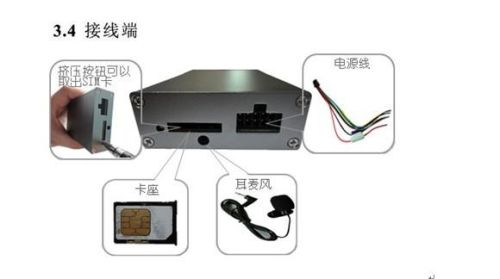
3 Hardware Description
| |
| |
| |
| |
4 Specification
content | specification |
size | 85mmx 63mmx 18mm (3.3 '* 2.5' * 0.71 ') |
net weight | 160g |
The internet | GSM / GPRS / GPS |
Network band | 900/1800 / 1900Mhz (850 Mhz Optional) |
chip | SIRF3 chip |
GPS Module | Simcom900 |
GPS Sensitivity | -159dBm |
GPS positioning accuracy | 3-30 Meter |
Data transmission | SMS, GPRS (CMNET) |
Location query | Phone or platform |
Operating Voltage | DC9V-30V |
spare battery | 3.7V 110mAh |
Standby Current | (50mA |
Storage temperature | -40 ° C to + 85 ° C |
Operating temperature | -20 ° C to + 70 ° C |
Operating relative humidity | 5% -95% RH |
5 Description
Place 5.1SIM card
Be sure to confirm SIM Card call display and no call transfer and PIN Code is disabled. SMS must be in plain text format , Does not recognize PDU format
5.1.1 The SIM card into the deck inside.
5.1.2 The cartridge is inserted locator host.
5.2 positioner mounting
GPS / GSM / GPRS Installation of car owned by a local service center needs professional maintenance technician responsible without the company's permission, users can not disassembly or repair, or peril.
5.2.1 Connecting the terminal box
5.2.2 Installing GPS locators
Installation Buju: (The following operations are under terminal without electricity, otherwise will be dangerous)
Terminal off the oil line: Yellow wire to connect to the relay 86 foot, 85 Pin connected 12V DC bottle positive. 87 Foot and 30 Foot tandem oil circuit.
| |
Emergency trigger the alarm circuit : Blue line contact an alarm button positive, black wire to the car battery negative.
| |
Terminal power line : White wire to relay 86 foot , 85 Pin connected 12V DC bottle positive, 87 feet and 30 feet in series power supply circuit.
| |
Terminal power lines: Red wire to car 12V DC bottle positive, black negative line contact an alarm button.
| |
5.3 Startup
5.3.1 The device connected to the car, and then the SIM Card into the device until the red light is on. The first time you use a satellite signal to outdoor areas.
5.3.2 in 10 To 40 Seconds, the device will search to GSM and GPS Signal and begins normal operation, the state of the device under normal blue lights every 2 Blinks once (blue light stays lit, GPS Module at work; but not locate; blue light has been lit; indicates GPS Module work, and has been positioned to . Fast flashing red lights indicate that the terminal device is communicating.)
5.3.3 When the device receives GPS After the signal is normal, you can use it and an instruction in any setting.
5.4 administrator number
5.4.1 Set the administrator number: Send SMS administrator + password' To the device in number, reply to set the administrator successful example: Instruction: Administrator 123456 (Initial password: 123456)
5.4.2 Remove the administrator number: Send SMS command to delete the number + Password + space + administrator number ' To the device in number, reply to the administrator to be deleted, for example: Administrator number is 13813813800, instruction: delete the number 123456 13813813800' (The default password is: 123456), after you remove the administrator number, device status changes from the administrator no administrator.
Note: The device has two operating modes, one is administrator mode, the other is non-Administrator mode device to factory settings without administrator mode in administrator mode there.. Only authorized number can only be set to operate the equipment (Please refer to the user manual authorization number 5.5). In the absence of administrator mode, all numbers are set up to operate on.
5.5 Authorization Number
5.5.1 Add an authorization number without administrator status: Using a mobile phone dial equipment in the number, this number is recorded after turning on the equipment down automatically added as an authorized number. (Can record up to four numbers, the first five numbers will overwrite the first one number.)
5.5.2 Add authorization number has administrator status: Send SMS commands with the administrator number 'Add number + password + space + number' to the device in the numbers, Reply to 'add numbers success' for example: To add 13813813801 as an authorized number, the instruction: Add number 123456 13813813801 (only administrators numbers can be operated)
5.5.3 Remove authorization number without administrator status: (See Instruction Manual 5.5.1)
5.5.4 Remove authorization number has administrator status: SMS command sent by the administrator number Delete number + password + space + number to the device in the numbers, Reply to 'delete numbers success' for example: To delete 13813813801 authorization number, the instruction: Delete number 123456 13813813801 (only administrator numbers can Send SMS.)
Password Manager 5.6
5.5.1 change Password: Send SMS commands to modify password + old password + space + new password to the device in the numbers, Reply to 'change the password success' for example: 888888 is new password modify instruction: Change Password 123,456,888,888.
5.5.2 restore the initial password: Send SMS Restore the initial password ' To the device in number, reply 'password is 123456'.
Note: There are administrators in the state, only the administrator numbers can send SMS commands, in the absence of an administrator state, all numbers can send SMS commands.
5.7 Mobile Positioning
5.7.1 Mobile Get latitude and longitude: Send SMS to mobile positioning device in number, reply to the following:
NOTE: Whether the device is shaped costumes administrator or no administrator under state, any number can send this message instructions.
5.7.3 obtain the location of a mobile phone device: Send SMS Get position ' To the device in number, reply to the location of the device.
Note: To support this feature, depending on the platform.
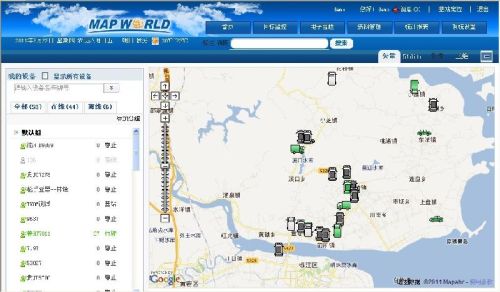
5.8 Platform Targeting
5.8.1 Equipment in the number of binding platform: Send SMS device number + equipment in the number to the device in number, reply 'Device number is' example: the equipment inside 13813813803 binding platform, the command: device number 13813813803 Reply to 'device number is 13813813803'.
5.8.2 Setting the IP address and port: Send SMS instruction address + IP address + port + port number to the device in the numbers, Reply to 'set the IP address and port of success' for example:. IP addresses 119.147.23.100 port 2332 ,instruction: address 119.147.23.100 port 2332 .
Note: Set the platform number, with the binding platform, to be valid according to the specific platform.
5.8.3 continuous positioning platform:
Set continuous positioning platform: Send SMS positioning interval number + * + * + to the device in the numbers, Reply to 'set up automatic positioning successful example: 30 seconds pass a platform; a total mass 60 times; the instruction: positioning interval 30 frequency 60 .
NOTE: Positioning interval must be greater than 30 Sec; To send unlimited; frequency is set to 0 .
Cancellation continuous positioning platform: Send SMS to cancel the positioning device in number, reply 'Cancel successful positioning.
Note: This feature can be realized through the platform, to support this feature, depending on the platform.
5.8.4 ACC status:
ACC Open state: Development Send SMS commands ACC Development interval + interval to send the device in number, reply 'set ACC to develop transmission interval success' for example: 30 seconds to transfer a data platform, the command: ACC Development interval to send 30'
ACC Off state: Hair ACC off sending SMS commands sent to the device interval interval + in number, reply 'set ACC OFF transmission interval success' for example: 60 seconds to transfer a data platform, the command: ACC Development interval to send 60'
5.9 Remote control oil and circuit
5.9.1 passage control
Disconnect the oil: Send SMS off oil + password , Reply to 'off oil success', and disconnect the vehicle's passage.
Recovery passage: Send SMS password oil + , Reply to 'oil success', and recover the oil vehicle.
5.9.2 circuit control
OFF circuit: Send SMS off + password , Reply to 'power success', and disconnect the vehicle's passage.
Recovery circuit: Send SMS powered + password , Reply to 'power success', and recovery of the vehicle passage.
NOTE: The remote control oil road and circuit, in a state administrator, only the authorized number can be set to send SMS commands, in the absence of an administrator state, all numbers can send SMS commands.
5.10 Remote monitoring
Dial equipment in the number you can listen .
Any listener: Send SMS to any listening devices in the numbers, Reply to 'set any monitor success', all the numbers are monitored. Device default to this mode.
Limit monitoring: Send SMS limit listening to the device in the numbers, Reply to 'set limits monitor success', authorization number can listen.
Close monitoring: Close listeners send SMS commands to the device in number, reply 'off monitor success', all the numbers are not listening.
5.11 electronic fence
And positioning platform bindings use.
5.12 motion alarm
5.12.1 Set motion alarm: Send SMS ' Motion alarm ' To the device in the numbers, Reply to 'set the motion alarm success'. When starting this function, when the vehicle movement will send a text message 'motion alarm + longitude + latitude + speed + time + date' to set this feature phones on, suggesting that the vehicle has been moved up. This function must have a valid GPS signal in time.
5.12.2 Cancel the motion alarm: Send SMS Cancel the motion alarm ' To the device in number, reply 'Cancel the motion alarm success'.
Note: There are administrators in the state, only the authorized number can be set to send SMS commands, in the absence of an administrator state, all numbers can send SMS commands.
5.13 speed alarm
5.13.1 Set motion alarm: Send SMS Speed alarm + speed ' To the device in the numbers, Reply to 'set speed alarm success'. When starting this function, the speed of the vehicle velocity exceeds the set time, it will send a message 'speed alarm + longitude + latitude + speed + Time + Date' Set this function to the phone, suggesting that the vehicle has been speeding up. This function must have a valid GPS signal in time.
5.13.2 Cancel speed alarm: Send SMS Cancel speeding alarm ' To the device in number, reply 'Cancel speeding alarm success'.
Note: There are administrators in the state, only the authorized number can be set to send SMS commands, in the absence of an administrator state, all numbers can send SMS commands.
5.14 Power failure alarm
When the power supply is cut off, the device send SMS alarm: Power alarm + latitude + longitude + speed + Time + Date 'to the administrator number and authorization number.
5.15 emergency alarm
Press and hold tight SOS Push button 3 Second, device sends SMS alarm 'emergency alarm + longitude + latitude + speed + Time + Date' to the administrator number and authorization number
5.16 Mileage statistics
And positioning platform bindings use.
5.17 device reboot
Send SMS Reboot the system + Password ' To the device in number, reply 'system is rebooting' and restart the machine, return to the oil supply state.
6 Precautions
6.1 Please read the instructions carefully before installing the device user.
6. 2 Before installation, please insert the SIM card, SIM card support positioning GPRS network traffic card (opened CMNET, not CMWAP traffic), and make sure the SIM card call display, no call forwarding, no password is set, or the device does not work .
6. 3 The device operating voltage of 9V-30V, please use within the operating voltage range.
6. 4 Please make sure that all equipment and cables connected correctly and then take the mains. Do not install or remove the case on the host power. If there are missing lines or misconnection, please turn off the power, otherwise easily damage the equipment.
6. 5 This device is a wireless communication device, turn off the mains before entering the fuel depot and dangerous places.
6.6 In order to avoid electromagnetic interference or incompatible configurations, posted notices of places stop using the device as required.
6.7 Keep the device in dry environments, humid environment tends to damage the internal circuitry.
6. 8 Please use a dry cloth to clean, do not use chemicals and cleaning agents.
7. Troubleshooting Methods
malfunction | Approach |
Unable to start | Please check the power supply is connected. |
hang on | Apparatus existence of an authorized number, an unauthorized number dials will not hang up. |
Monitor Fail | Check listening. |
Location information is all zeros | Please open outdoor equipment. |
8. Operation Command Set
| | Features | SMS content | SMS reply | Remark |
1 | Set the administrator number | Administrator 123456 | Setting Administrator success | The initial password is: 123456 |
Remove the administrator number | Delete number 123456 13813813800 | Administrators are deleted | After you remove the administrator is no administrator | |
2 | Add Authorization Number | Add number 123456 13813813800 | Add number Success | This is a state administrator settings; without management status; dial device number is automatically recorded as the authorized number |
Remove authorization number | Delete number 123456 13813813800 | Delete number Success | ||
3 | change Password | Change Password 123 456 888 888 | Change Password Success | |
Initialization code | The initial password recovery | 123456 | | |
4 | Mobile Get latitude and longitude | Mobile Positioning | SMS contains the latitude and longitude information | |
Get phone location | Get Location | location | Platform Support | |
5 | Binding platform | Equipment Number 13813813803 | Equipment number is 13813813803 | |
Setting the IP address and port | Address 119.147.23.100 port 2332 | Setting the IP address and port success | | |
6 | Set up automatic continuous positioning | Positioning interval 30 times 60 | Set up automatic positioning successful | |
Cancellation continuous positioning move | Cancel Location | Cancel successful positioning | | |
7 | ACC open state | ACC Development interval to send 30 | Set ACC developed successfully send interval | |
ACC off state | ACC Development interval to send 60 | Set ACC OFF transmission interval success | | |
8 | Cut off the oil | Off oil 123456 | Off oil success | |
Recovery passage | Oil 123456 | Power Success | | |
9 | Cut off the circuit | Off 123456 | Off success | |
Recovery circuit | Power 123456 | Power Success | | |
10 | Any monitor | Any monitor | Set any monitor success | Dial terminal number to listen |
Limit monitor | Limit monitor | Set a limit monitor success | ||
Close monitoring | Close monitoring | Close monitoring success | ||
11 | Set motion alarm | Motion alarm | Set motion alarm success | |
Cancel the motion alarm | Cancel the motion alarm | Cancel the motion alarm success | | |
12 | Setting speed alarm | Overspeed alarm 80 | Setting speed alarm success | |
Cancel speed alarm | Cancel speed alarm | Cancel speeding alarm success | | |
13 | Power failure alarm | | | Reply to the administrator number or authorization number on |
14 | SOS distress | | | Reply to the administrator number or authorization number on |
15 | Reboot | Reboot the system 123456 | The system is restarted | |

&img=www.atupapa.com/show/wxbuyer/img/apk.png&url=//www.atupapa.com/show/wxbuyer/whatnear.apk)