- Marketplace
- Merchants
- Restaurants
- UAE house
- Cloud accounting (GCC VAT)
- Me
- Cart
- My order
- Address book
- Favorite
- Link
- About us
- Download App
- 中文
- Merchant panel
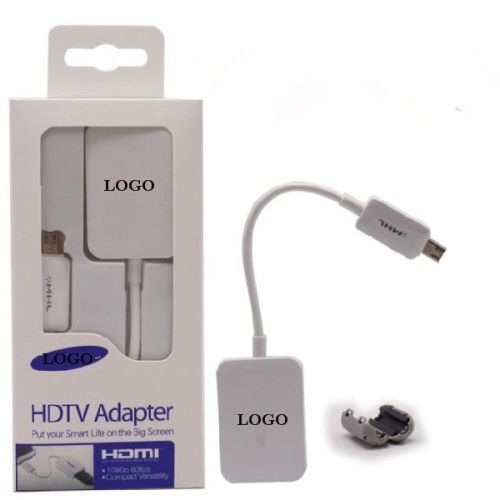
for MISC Samsung HDTV Adaptor for Samsung S4
Basic Info.
Model NO.: HDTV ADAPTOR FOR SAMSUNG S4
Connector: USB
Switch: Without Switch
Retractable: Retractable
Charging Function: Without Charging Function
Lenght: 19.2cm
Gender: Male-Female
Shielding: Non-Shielded
Connector Type: HDTV
Application: Smart Phone
Export Markets: Global
Additional Info.
Trademark: OEM
Packing: Retail Packaging
Origin: Made in China
Production Capacity: 5000/ Week
Product Description
HDTV adapter For Samsung Galaxy S4
-MHL 2.0 technology, external power source not required
-Shows your 1080P HD video on big
ET-H10FAUWEGWW MHL HDTV HDMI Adapter for Galaxy S4 I9500 / S3 I9300 / Note 2 N7100
Mirror your S4 through the standard HDMI output on a compatible TV
With this MHL HDTV adaptor you can playback video content through your Galaxy S4 onto your High Definition TV. It also allows you to mirror what is shown on your S4's screen so you can enjoy your favourite media content directly from your phone to your HDTV.
Simple and easy to use
Simple and intuitive, the Galaxy S4 MHL HDTV Adapter is easy to set up and connect to your Galaxy S4. Simply connect the adapter to your smartphone via the Micro USB and use a regular HDMI cable to connect the adapter to your HDTV. Finally, to ensure that the connection can be established, the adapter needs to be powered using a Micro USB charger.
Reverse compatability supports use with the Galaxy S3 and Galaxy Note 2
The design of this MHL adapter ensures that it is compatible for use with both the Galaxy S3 and Note 2 (MHL 1.0 support only) .
UNOfficial accessory
This is an unofficial product made to the highest product quality and safety standards. Additionally, the product is compatible with the previously mentioned smartphone models.
Follow the steps below to connect:
1. Connect one end of HDMI cable into the MHL adapter.
2. Connect the other end to the HDMI port on your TV. Make sure your TV is in HDMI mode (HDMI cable not included)
3. Connect your ORIGINAL travel charger to the MHL adapter. (not required for S4 but required for S3 and Note 2)
The TV screen will display what is on your device home screen.
Package Components:
Brand new in retail package
1X MHL adapter
1X multiple languages manual
-MHL 2.0 technology, external power source not required
-Shows your 1080P HD video on big
ET-H10FAUWEGWW MHL HDTV HDMI Adapter for Galaxy S4 I9500 / S3 I9300 / Note 2 N7100
Mirror your S4 through the standard HDMI output on a compatible TV
With this MHL HDTV adaptor you can playback video content through your Galaxy S4 onto your High Definition TV. It also allows you to mirror what is shown on your S4's screen so you can enjoy your favourite media content directly from your phone to your HDTV.
Simple and easy to use
Simple and intuitive, the Galaxy S4 MHL HDTV Adapter is easy to set up and connect to your Galaxy S4. Simply connect the adapter to your smartphone via the Micro USB and use a regular HDMI cable to connect the adapter to your HDTV. Finally, to ensure that the connection can be established, the adapter needs to be powered using a Micro USB charger.
Reverse compatability supports use with the Galaxy S3 and Galaxy Note 2
The design of this MHL adapter ensures that it is compatible for use with both the Galaxy S3 and Note 2 (MHL 1.0 support only) .
UNOfficial accessory
This is an unofficial product made to the highest product quality and safety standards. Additionally, the product is compatible with the previously mentioned smartphone models.
Follow the steps below to connect:
1. Connect one end of HDMI cable into the MHL adapter.
2. Connect the other end to the HDMI port on your TV. Make sure your TV is in HDMI mode (HDMI cable not included)
3. Connect your ORIGINAL travel charger to the MHL adapter. (not required for S4 but required for S3 and Note 2)
The TV screen will display what is on your device home screen.
Package Components:
Brand new in retail package
1X MHL adapter
1X multiple languages manual

&img=www.atupapa.com/show/wxbuyer/img/apk.png&url=//www.atupapa.com/show/wxbuyer/whatnear.apk)