- Marketplace
- Merchants
- Restaurants
- UAE house
- Cloud accounting (GCC VAT)
- Me
- Cart
- My order
- Address book
- Favorite
- Link
- About us
- Download App
- 中文
- Merchant panel
Wholesale 7mm USB Snake Tube Camera
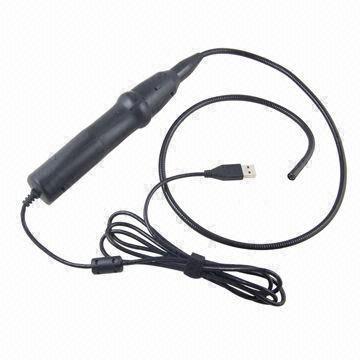
This Mini USB Inspection Endoscope use optoelectronic technology to investigate hard-to-reach area. It helps you to diagnose broken part, weld point and machine equipment to save time and increase productivity. It is also can be used in medical treatment. PE covered cable with ABS handler Specifications Installing the Software: Run the application RsCap1.10. exe in the disk (please copy the file to your computer for future use) How to take still picture: If this is your very first capture, select Set Capture File from File menu to configure the folder where the pictures will be stored. A browser window will open, select a desired folder and click open. Now all the taken pictures will be stored in the folder you selected. Press shutter button on the handle of endoscope to take picture, you can now take as many pictures as you wish just by pressing the shutter button. How to capture and save video: If this is your very first capture, select Set Capture File from File menu to configure the folder where the video will be stored. A browser window will show, select a desired folder and input a file name for the video. Now all the video will be stored in the folder you selected. Click Capture) Start Capture to start the video capture, to stop the video capture click the Capture ) Stop Capture. The video will be saved in AVI format under the name which you had input before. You can configure the video property (e.g. brightness) from 'Video Capture Filter' in the 'Options' menu. APPLICATIONS Medical observation: medicine observation, hair, skin. Package 1 * USB Endoscope |

&img=www.atupapa.com/show/wxbuyer/img/apk.png&url=//www.atupapa.com/show/wxbuyer/whatnear.apk)