- Marketplace
- Merchants
- Restaurants
- UAE house
- Cloud accounting (GCC VAT)
- Me
- Cart
- My order
- Address book
- Favorite
- Link
- About us
- Download App
- 中文
- Merchant panel
Wireless camera | 2.4 inch LED wireless baby camera kit
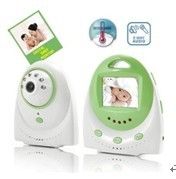
Adopt 2.4GHz Frenquency transmissionaccord with FCC,CE Standard
With high resolution 2.4' LCD display screen
Have operation text menu display function
Support one main and much attach,namely one receiver can connect 4 transmitters
Long-distance transmission:Up to 200-300m in open field;
Clear night vision function can realize 24 hours monitoring
Half-duplex Voice TransmissionVoice clear, volume of sound (0~10) is adjustable
Adjustable LCD screenthe brightness of LCD (0-10) is adjustable
Vox Alarm functionthe volume of baby sound or happened in baby room over the volume which software of
baby monitor has been fixed will alarm to monitor (screen automatically turn off,and then turn on with sound),
to remind parents to pay more attention to baby.
Monitor with TV Out function,support TV display;
Monitor with real time function,and display real time information;
Baby camera with temperature detection function and real-time display in the LCD Monitor;
Support music player,eg, play sleeping music to help baby go to sleep.
With pairing code function: make pairing through the pairing code buttons of monitor and camera
5. Microphone, pick up voice signal
6. Photoconductive resistance- Turn on /turn off night vision IR lights automatically, The IR lights will not on
when the light is strong;the IR lights will on when it is dim.
7. 6V Power input
Camera Back
8. Temperature detector 9. Speaker(loudspeaker) 10.Battery Cover 11.Battery Box( 4pieces AAA battery)
Monitor Key Function Illustration
Monitor Front
1:UP Key 2: Down Key Move Up and Down in the functional menu, adjust receiver volume
in watching interface
3: Power Key
4:6V Power input
5:Microphone, pick up voice signal
6:Sound Volume Indicator,4 grades instructions
7:Power LED: Work indicator and pair code indicator
8:LCD Screen
9:Left Key
10:Enter Key, Short press to enter or exit menu, long press to set up real-time time
11:Right Key Left and right can adjust the numerical in functional menu,switch channels in
watching interface,Left reduces the Channels and Right increases the Channels
12. AV Output,It is TV Display and without LCD Display when insert TV output(It will take
about 2-3 seconds to switch over for insert or pull out)
13.Talk Key, Two-way talk/Play music Key It can receive the voice from the camera before
pressing this button.Meanwhile,it can receive the voice from the Monitor after pressing this
button(LCD display T),and the Monitor has voice to realize two-way talk function(LCD Screen
without T display) when press Talk key again.Also,long press Talk key to control the play or
stop music.
14 Pair: When Power key in ON position,the power indication is on for a long time,and it means
that it is in the state of work.If you press this button for 3 seconds until the power indicator flash,
it means it is pair code state,meanwhile,you only need to press the power key of the transmitter
until it flashes once,it proves the pair code is successful,and it can work after loosing power key.

&img=www.atupapa.com/show/wxbuyer/img/apk.png&url=//www.atupapa.com/show/wxbuyer/whatnear.apk)